방문 대시보드 구성
목적과 이점
방문 대시보드는 환자의 방문에 대한 모든 세부 정보를 표시합니다. 상단에는 날짜 컨트롤이 있어 의료 제공자가 환자의 과거 방문 세부 정보를 탐색할 수 있습니다. 여러 ‘표시 컨트롤’을 선택하여 환자 대시보드에 표시할 정보를 구성할 수 있습니다.
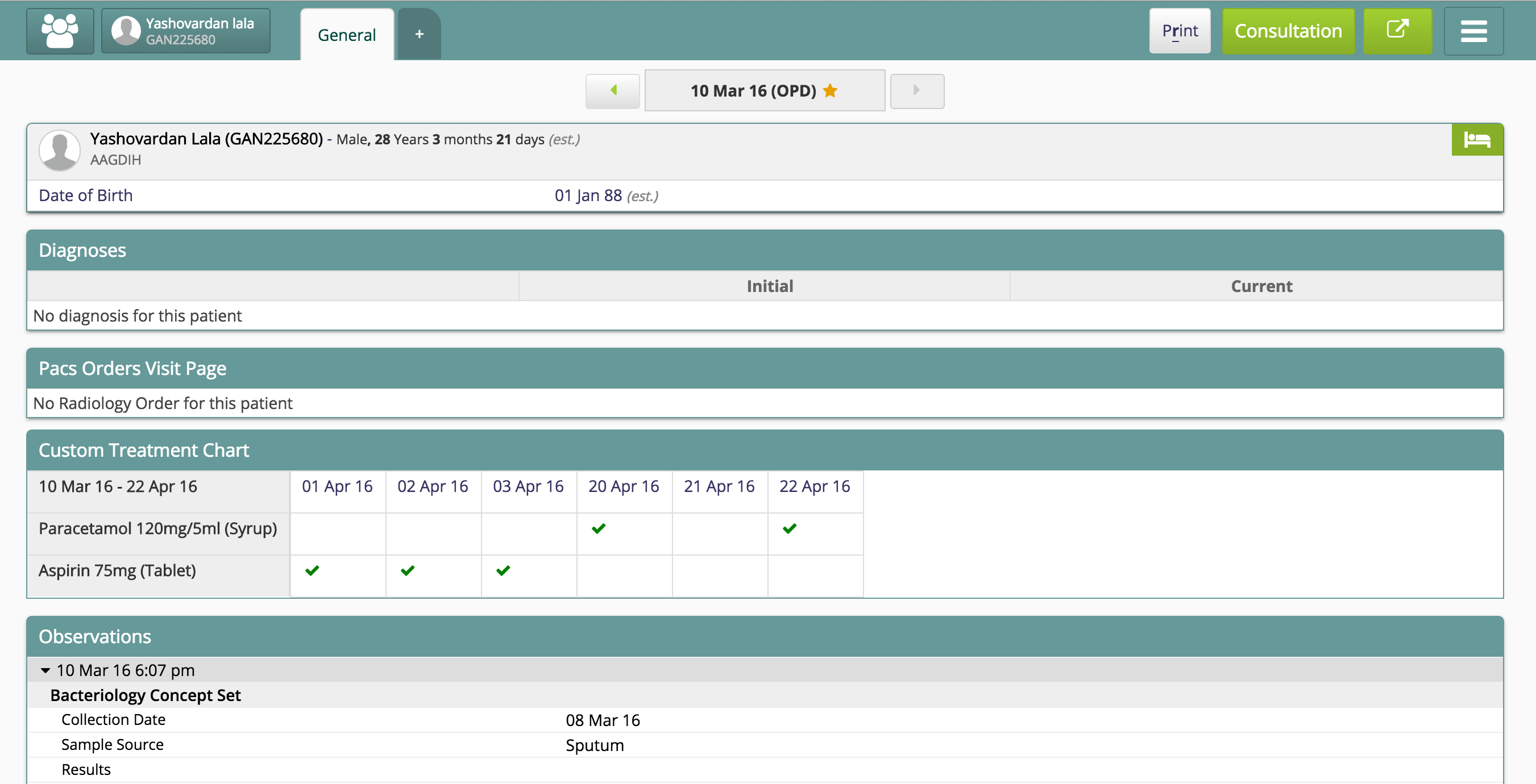
방문 대시보드
단계
환자 대시보드에 방문 표시 컨트롤 구성
방문 대시보드 구성
구성의 sections 아래에서 모든 표시 컨트롤을 방문 대시보드에 구성할 수 있습니다. 표시 컨트롤 구성 방법은 을 참고하십시오. 다음은 환자 방문 대시보드 구성 예시입니다.
Sample Visit Dashboard Configuration
{
    "general":{
        "translationKey": "DASHBOARD_TAB_GENERAL_KEY",
        "displayByDefault": true,
        "printing": {
            "title": "Bahmni",
            "header": "Visit",
            "logo": "../images/bahmniLogo.png"
        },
        "defaultSections": true,
        "sections": {
            "pivotTable":{
                "type": "pivotTable",
                "displayOrder": 0,
                "title": "Vitals Flowsheet",
                "config": {
                    "groupBy": "encounters",
                    "obsConcepts": [
                        "Vitals",
                        "Pulse",
                        "Diastolic",
                        "Systolic",
                        "Temperature",
                        "RR",
                        "SPO2",
                        "Height",
                        "WEIGHT",
                        "M/C Days"
                    ],
                    "labConcepts": ""
                }
            },
            "pacsOrders":{
                "type":"pacsOrders",
                "displayOrder": 1,
                "translationKey": "PACS_ORDERS_VISIT_PAGE_KEY",
                "config":{
                    "orderType": "Radiology Order"
                }
            }
        }
    },
    "dischargeSummary":{
        "translationKey": "DASHBOARD_TAB_DISCHARGE_SUMMARY_KEY",
        "printing": {
            "title": "Bahmni",
            "header": "Discharge Summary",
            "logo": "../images/bahmniLogo.png"
        },
        "sections": {
            "PatientInformation":{
                "type": "patientInformation",
                "displayOrder": 0,
                "config": {
                    "title": "PatientInformation",
                    "patientAttributes": ["caste", "class", "education", "occupation", "debt", "distanceFromCenter", "isUrban", "cluster","RationCard", "familyIncome"],
                    "addressFields": ["address1", "address2", "cityVillage", "countryDistrict"]
                }
            },
            "admissionDetails":{
                "type": "admissionDetails",
                "displayOrder": 1,
                "config": {
                    "showDetailsButton": true,
                    "translationKey": "DISCHARGE_SUMMARY_ADMISSION_DETAILS_KEY"

                }
            },
            "weightInitial":{
                "type": "observation",
                "displayOrder": 2,
                "translationKey":"DISCHARGE_SUMMARY_AT_ADMISSION_KEY",
                "config": {
                    "conceptNames": ["WEIGHT"],
                    "scope": "initial"
                }
            },
            "weightLatest": {
                "type": "observation",
                "displayOrder": 3,
                "translationKey":"DISCHARGE_SUMMARY_AT_DISCHARGE_KEY",
                "config": {
                    "conceptNames": ["WEIGHT"],
                    "scope": "latest"
                }
            },
            "diagnoses":{
                "type": "diagnosis",
                "displayOrder": 4,
                "config": {
                    "translationKey" : "DISCHARGE_SUMMARY_DIAGNOSIS_KEY",
                    "showCertainty": false,
                    "showOrder": false,
                    "showDetailsButton": true
                }
            },
            "clinicalNotes":{
                "type": "observation",
                "displayOrder": 5,
                "translationKey": "DISCHARGE_SUMMARY_CLINICAL_NOTES_KEY",
                "config": {
                    "conceptNames": [
                        "History and Examination Notes",
                        "Discharge Summary",
                        "Lab Investigation Notes",
                        "Radiology Notes",
                        "Other Notes"
                    ],
                    "scope": "latest",
                    "numberOfVisits": "1"
                }
            },
            "labInvestigations":{
                "type": "investigationResult",
                "displayOrder": 6,
                "config": {
                    "translationKey":"LAB_INVESTIGATION",
                    "showChart": true,
                    "showTable": false,
                    "showNormalLabResults": true,
                    "showCommentsExpanded": true,
                    "showAccessionNotes": true,
                    "numberOfVisits": 10,
                    "initialAccessionCount": 1,
                    "latestAccessionCount": 1
                }
            },
            "Treatments": {
                "type": "treatment",
                "displayOrder": 6,
                "config": {
                    "translationKey": "VISIT_TITLE_TREATMENTS_KEY",
                    "showFlowSheet": true,
                    "showListView": true,
                    "showOtherActive": false,
                    "showDetailsButton": true,
                    "showRoute": true,
                    "showDrugForm": true,
                    "showProvider":false
                }
            },
            "adviceOnDischarge":{
                "type": "observation",
                "displayOrder": 8,
                "translationKey":"DISCHARGE_SUMMARY_ADVICE_ON_DISCHARGE_KEY",
                "config": {
                    "conceptNames": [
                        "Additional Advice on Discharge",
                        "Follow up Date",
                        "Discharge Summary, Plan for follow up"
                    ],
                    "scope": "latest"
                }
            }
        }
    },
    "orders":{
      "translationKey": "DASHBOARD_TAB_ORDERS_KEY",
      "sections": {
          "Radiology Orders": {
              "type": "order",
              "displayOrder": 0,
              "translationKey": "Radiology Orders",
              "config": {
                  "translationKey": "Radiology Orders",
                  "name": "ordersControl",
                  "orderType": "Radiology Order",
                  "conceptNames": [
                      "Summary"
                  ]
              }
          }
      }

    }
}| Field Name | Description |
|---|---|
| translationKey | Name of the visit tab. This will be displayed as the tab label |
| displayByDefault | Will always show this tab by default on load |
| printing | Header information when printing a visit tab |
| defaultSections | When set to false, will exclude the default pre-configured patient visit widgets, and only show the ones you configure in this tab. Note: At least one dashboard/tab should have this as true. See this discussion. |
| sections | An array that lists all the widgets (and its configs) to be displayed in this tab. When 'defaultSections' is set to true, these sections will be append at the end of the default sections |
하위 문서
원문 정보
원문 보기 ↗Bahmni Wiki · CC BY-SA 4.0