환자 목록/대기열 구성
목적 및 이점
이 기능은 Clinical, ADT(입원), Orders 같은 여러 모듈에서 환자 목록(환자 대기열)을 설정하는 데 사용합니다. 의료 제공자는 일반적으로 활성 방문, 입원 환자, 방사선 주문이 있는 환자 등 미리 정의한 기준의 환자 목록을 보려고 합니다. 여러 탭을 구성할 수 있으며 각 탭에는 Active, Programs 같은 이름과 조건에 맞는 환자 목록을 표시하기 위해 Bahmni가 실행할 SQL 쿼리를 연결할 수 있습니다.
환자 목록은 타일 위젯이나 표의 목록 보기로 표시할 수 있습니다.
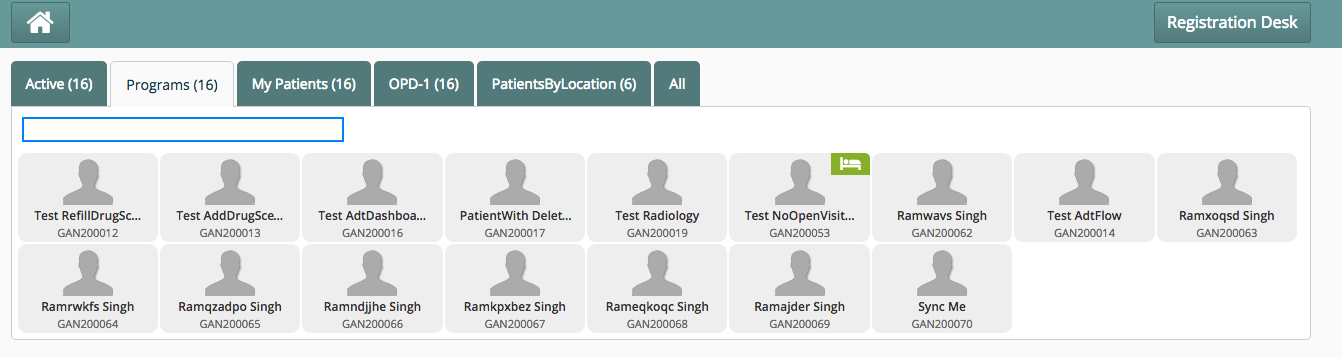
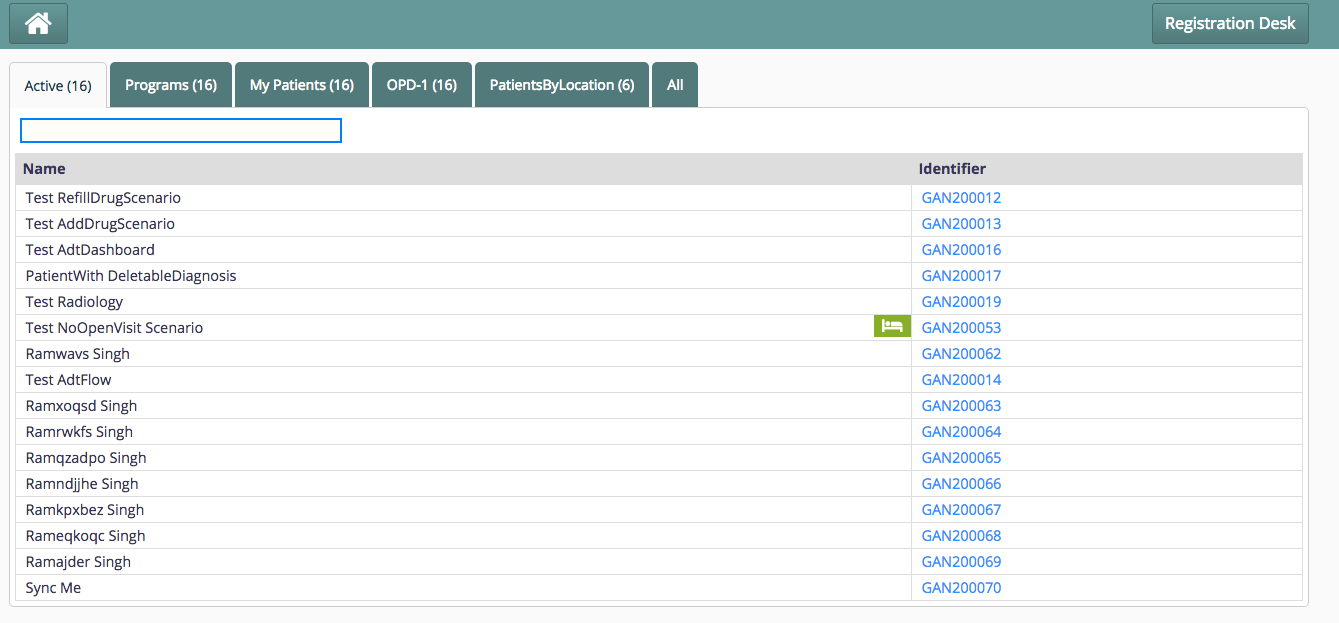
절차
OpenMRS에 전역 속성 생성
emrapi.sqlSearch.activePatients 같은 이름으로 새 속성을 만듭니다. 필요한 필드를 반환하는 다음과 같은 SQL 쿼리를 속성 값으로 설정합니다.
select distinct
concat(pn.given_name,' ', pn.family_name) as name,
pi.identifier as identifier,
concat("",p.uuid) as uuid,
concat("",v.uuid) as activeVisitUuid,
IF(va.value_reference = "Admitted", "true", "false") as hasBeenAdmitted
        from visit v
        join person_name pn on v.patient_id = pn.person_id and pn.voided = 0
        join patient_identifier pi on v.patient_id = pi.patient_id
        join person p on v.patient_id = p.person_id
        join visit_attribute va on v.visit_id = va.visit_id and va.value_reference = "Admitted" and va.voided = 0
        join visit_attribute_type vat on vat.visit_attribute_type_id = va.attribute_type_id and vat.name = "Admission Status"
        where v.date_stopped is null AND v.voided = 0
UI가 데이터를 올바르게 렌더링하려면 SQL에 다음 필드가 필요합니다.
- name: 환자 위젯에 환자 이름으로 표시
- identifier: 환자 위젯에 환자 식별자로 표시
- uuid: 환자를 클릭해 선택하고 적절한 환자 페이지로 이동할 때 사용하며 환자 이미지 로드에도 필요
- activeVisitUuid: 환자를 선택/클릭할 때 visitUuid를 대상 페이지로 전달
- hasBeenAdmitted: true이면 환자가 입원했음을 나타내는 녹색 침대 아이콘을 환자 위젯에 표시
extension.json에 구성 추가
환자 목록을 표시할 모듈 폴더의 extension.json에 다음 구성을 추가합니다. 예를 들어 Clinical 모듈에서 활성 환자 목록을 보려면 openmrs/apps/clinical/extension.json을 편집합니다.
"bahmniClinicalPatientsSearchAllActivePatients": {
    "id": "bahmni.clinical.patients.search.allActivePatients",
    "extensionPointId": "org.bahmni.patient.search",
    "type": "config",
    "extensionParams": {
      "searchHandler": "emrapi.sqlSearch.activePatients",
      "translationKey": "MODULE_LABEL_ACTIVE_KEY",
      "forwardUrl": "#/default/patient/{{patientUuid}}/dashboard"
    },
    "order": 1,
    "requiredPrivilege": "app:clinical"
  },
주요 필드
| Key | Use | Mandatory |
|---|---|---|
| id | Some unique ID for this block. | Yes |
| extensionPointId | Indicates that this section is for patient search queues. The value should always be "org.bahmni.patient.search" | Yes |
| order | Display order of tabs (1 is left most) | Yes |
| requiredPrivilege | To control the visibility of queue based on the privilege. | No |
| type | Should always be "config" | Yes |
| Extension Params | ||
| searchHandler | Points to the OpenMRS Global Property name, which holds the SQL query. If you don't put this key, then by default Bahmni shows ALL patients. | No |
| translationKey | Used for Internationalising the label / caption of the tabAdd the "translationKey" and "label" to the locale file in i18n folder. For list of active patients in clinical tab, go to openmrs/i18n/clinical/locale_en.json (See sample here) | Yes |
| forwardUrl | Determines the landing page after clicking on the patient. One can give any URL here (hardcoded or parameterized). | Yes |
| view | Decides which view to show: Tile view / tabular view. Possible values: tabular, tile (default).The tabular view is only supported if a searchHandler is specified. | No |
| showPrint | When it set to true, print button on the page is enabledBy Default it is false | No |
| printHtmlLocation | Configured along with showPrint set to true. Gives the location of the html file to be used for printing. Sample file | No |
| searchColumns | Columns on which search can be applied can be configured as a list to this key. If it is not specified, default search works on columns with titles 'Identifier', 'Name' | No |
"extensionParams" : {
	"showPrint": true,
	"printHtmlLocation": "/bahmni_config/openmrs/apps/dataintegrity/patientListPrint.html",
	"searchColumns" : ["DQ_COLUMN_TITLE_TREATMENT_REG_NO", "DQ_COLUMN_TITLE_NAME"]
}고위험 환자를 표시하는 구성:
아래 샘플 구성으로 고위험 환자를 모두 나열합니다.
"highRisk": {
    "id": "bahmni.clinical.patients.search.allPatients",
    "extensionPointId": "org.bahmni.patient.search",
    "type": "config",
    "extensionParams": {
        "searchHandler": "emrapi.sqlSearch.highRiskPatients",
        "display":"High Risk",
        "forwardUrl" : "#/patient/{{patientUuid}}/dashboard",
 "additionalParams" : {
          "tests": "'HIV ELISA (Blood)', 'HIV ELISA (Serum)', 'ZN Stain (Sputum)', 'HbsAg ELISA'"
  }
          },
 "label": "High Risk",
    "order": 4,
    "requiredPrivilege": "app:clinical"
}| Key | Value | Required |
|---|---|---|
| tests | Field under additional params where you can configure test names to be considered as high risk for a patient | Yes |
대기열 최적화
대용량 데이터에 너무 많은 대기열/목록을 구성하면, 특히 탭을 연이어 클릭할 때 속도가 느려지고 성능이 저하될 수 있습니다. 최적화를 위해 대기열에 디바운싱 기법을 사용하도록 구성할 수 있습니다. 디바운싱은 시간이 오래 걸리는 작업이 너무 자주 실행되어 웹 페이지 성능을 멈추지 않도록 하는 호출 빈도 제한 방식입니다.
app.json에 다음 "patientSearch" 구성을 정의합니다.
"config" : {
     .....
     .....
    "patientSearch": {
  		"debounceSearch": true
  		"fetchDelay": 2000,
  		"serializeSearch": true
	}
}
각 항목의 의미:
| Key | Use | Mandatory |
|---|---|---|
| debounceSearch | whether to employ rate-limiting techniques or not | true |
| fetchDelay | delay in milliseconds for rate-limiting | true |
| serializeSearch | whether to serialize the patient searches amongst queues | false |
환자 대기열 개선
사용자가 탭을 자주 전환하면 각 탭의 데이터를 얻기 위한 API가 호출됩니다. 이러한 무작위 호출을 피하거나 줄이기 위해 요청을 디바운싱합니다.
환자 대기열 디바운싱은 마지막 호출 이후 지정된 대기 시간이 지난 뒤에만 함수를 실행하도록 지연합니다. 사용자가 탭을 계속 무작위로 클릭할 때 같은 매개변수로 환자 검색 API를 수 초 안에 반복 호출해도 가치가 없습니다. 이를 제한하면 성능이 개선되고 불필요한 네트워크 호출을 막을 수 있습니다.
예:
"patientSearch": { "debounceSearch": true, "fetchDelay": 2000, "serializeSearch": true }}
열 숨기기 및 식별자 선택
환자 검색 결과를 표 보기로 표시할 때 특정 열을 숨겨 더 깔끔하고 집중된 화면으로 사용자 지정할 수 있습니다. 검색 결과에서 불필요한 정보를 제거하여 사용 경험을 간소화할 수 있습니다. 또한 특정 열을 환자 검색 대기열 표 보기의 "identifier"로 선택할 수 있습니다.
이 옵션을 구성하려면 애플리케이션 구성 파일(`app.json`)을 다음 설정으로 업데이트합니다.
"config" : {
     .....
     .....
    "ignoredTabularViewHeadings": ["extraIdentifierVal","uuid","activeVisitUuid","hasBeenAdmitted","display","image","$$hashKey","birthDate","extraIdentifiers","personId","deathDate","addressFieldValue","dateCreated","customAttribute","patientProgramAttributeValue"],
    "identifierHeadings": ["identifier"]
}
각 항목의 의미:
| Key | Use | Mandatory |
|---|---|---|
| identifierHeadings | To set a particular column as an identifier when viewing patient search queue in tabular view | true |
| ignoredTabularViewHeadings | To ignore columns when viewing patient search queues in tabular view | false |
Bahmni Wiki · CC BY-SA 4.0