Configure Patient Lists / Queues
Purpose and Benefits
This feature is used to set up patient lists (also known as patient queues) across various modules like Clinical, ADT (In-Patient) and Orders. The expectation usually is that health providers would like to see a list of patients based on some predefined criteria (like active visits, or admitted patients, or patients with radiology orders, etc). One can choose to configure various tabs and each tab can have a name (like Active, Programs, etc), and an associated SQL Query which will be executed by Bahmni to show a list of qualifying patients.
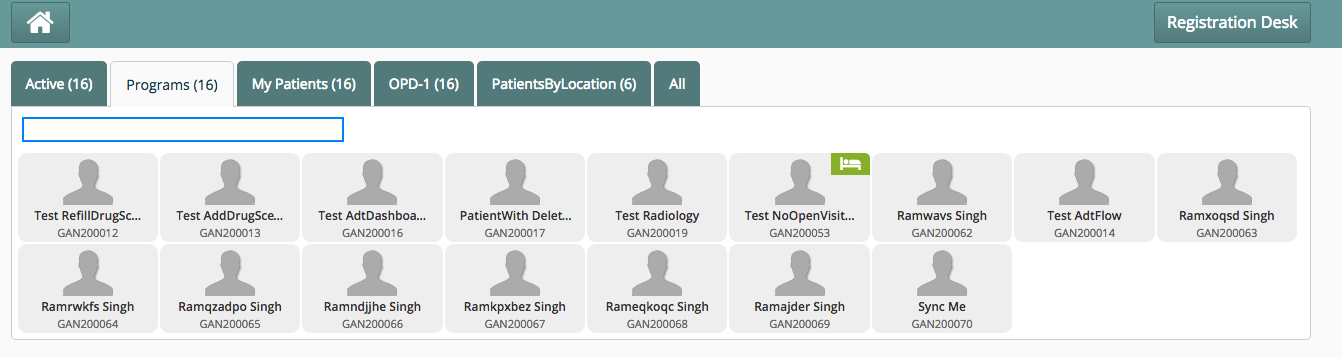
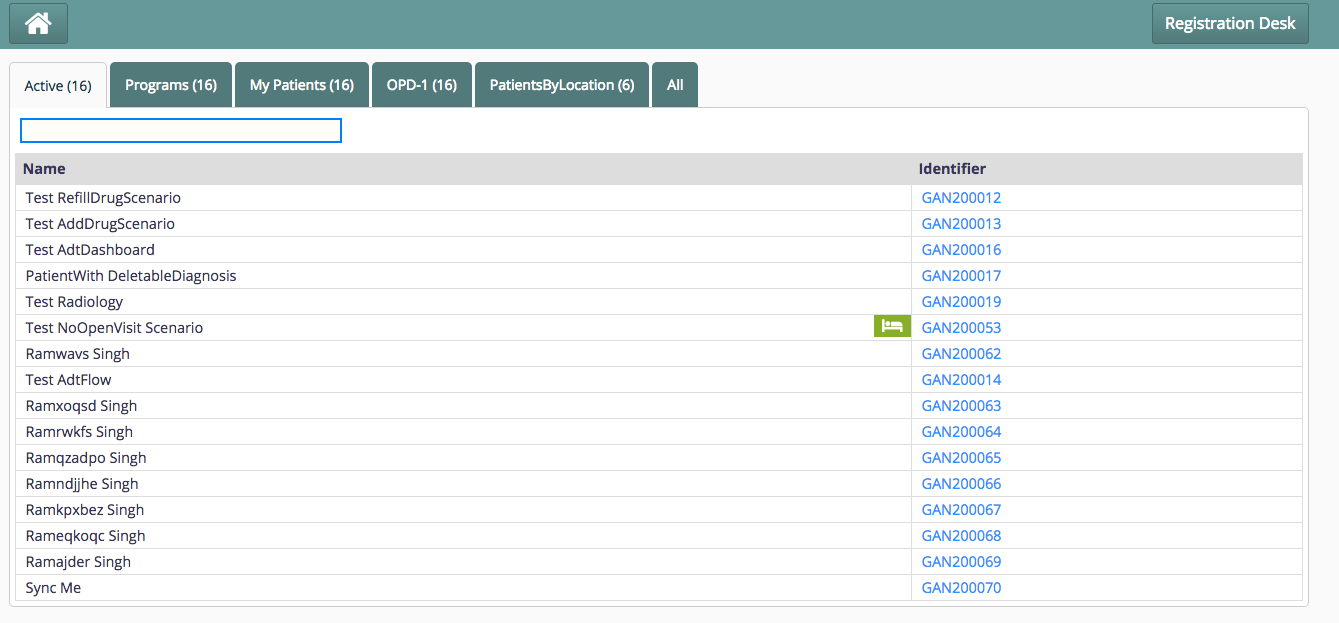
The list of patients can be shown as tiled widgets, or as a list view in a table.
Steps
Create Global Property in OpenMRS
Create a new Property in with the name like emrapi.sqlSearch.activePatients. Set the value for the property to a SQL query like this (with appropriate fields being returned):
select distinct
concat(pn.given_name,' ', pn.family_name) as name,
pi.identifier as identifier,
concat("",p.uuid) as uuid,
concat("",v.uuid) as activeVisitUuid,
IF(va.value_reference = "Admitted", "true", "false") as hasBeenAdmitted
        from visit v
        join person_name pn on v.patient_id = pn.person_id and pn.voided = 0
        join patient_identifier pi on v.patient_id = pi.patient_id
        join person p on v.patient_id = p.person_id
        join visit_attribute va on v.visit_id = va.visit_id and va.value_reference = "Admitted" and va.voided = 0
        join visit_attribute_type vat on vat.visit_attribute_type_id = va.attribute_type_id and vat.name = "Admission Status"
        where v.date_stopped is null AND v.voided = 0
The following fields are needed in the SQL so that the UI can render the data appropriately:
- name: For showing this value as patient name on the patient widget.
- identifier: For showing the patient identifier on the patient widget.
- uuid: For selecting the patient (on click), and using this value to navigate to appropriate patient page. This is also needed to load the patient image.
- activeVisitUuid: For passing the visitUuid to the forwarding page when this patient is selected/clicked.
- hasBeenAdmitted: If this is true for a patient, then a green bed icon shows up on the patient widget to indicate this patient is admitted.
Add configuration to extension.json
Add the following configuration in extension.json file in the module folder where the patient list is to be displayed. For e.g. - To see a list of active patients in the clinical module, edit the extension.json file in location: openmrs/apps/clinical/extension.json
"bahmniClinicalPatientsSearchAllActivePatients": {
    "id": "bahmni.clinical.patients.search.allActivePatients",
    "extensionPointId": "org.bahmni.patient.search",
    "type": "config",
    "extensionParams": {
      "searchHandler": "emrapi.sqlSearch.activePatients",
      "translationKey": "MODULE_LABEL_ACTIVE_KEY",
      "forwardUrl": "#/default/patient/{{patientUuid}}/dashboard"
    },
    "order": 1,
    "requiredPrivilege": "app:clinical"
  },
Key Fields
| Key | Use | Mandatory |
|---|---|---|
| id | Some unique ID for this block. | Yes |
| extensionPointId | Indicates that this section is for patient search queues. The value should always be "org.bahmni.patient.search" | Yes |
| order | Display order of tabs (1 is left most) | Yes |
| requiredPrivilege | To control the visibility of queue based on the privilege. | No |
| type | Should always be "config" | Yes |
| Extension Params | ||
| searchHandler | Points to the OpenMRS Global Property name, which holds the SQL query. If you don't put this key, then by default Bahmni shows ALL patients. | No |
| translationKey | Used for Internationalising the label / caption of the tabAdd the "translationKey" and "label" to the locale file in i18n folder. For list of active patients in clinical tab, go to openmrs/i18n/clinical/locale_en.json (See sample here) | Yes |
| forwardUrl | Determines the landing page after clicking on the patient. One can give any URL here (hardcoded or parameterized). | Yes |
| view | Decides which view to show: Tile view / tabular view. Possible values: tabular, tile (default).The tabular view is only supported if a searchHandler is specified. | No |
| showPrint | When it set to true, print button on the page is enabledBy Default it is false | No |
| printHtmlLocation | Configured along with showPrint set to true. Gives the location of the html file to be used for printing. Sample file | No |
| searchColumns | Columns on which search can be applied can be configured as a list to this key. If it is not specified, default search works on columns with titles 'Identifier', 'Name' | No |
"extensionParams" : {
	"showPrint": true,
	"printHtmlLocation": "/bahmni_config/openmrs/apps/dataintegrity/patientListPrint.html",
	"searchColumns" : ["DQ_COLUMN_TITLE_TREATMENT_REG_NO", "DQ_COLUMN_TITLE_NAME"]
}Configuration to show patients who have high risk:
Use the below sample configuration to list all the patients who have high risk.
"highRisk": {
    "id": "bahmni.clinical.patients.search.allPatients",
    "extensionPointId": "org.bahmni.patient.search",
    "type": "config",
    "extensionParams": {
        "searchHandler": "emrapi.sqlSearch.highRiskPatients",
        "display":"High Risk",
        "forwardUrl" : "#/patient/{{patientUuid}}/dashboard",
 "additionalParams" : {
          "tests": "'HIV ELISA (Blood)', 'HIV ELISA (Serum)', 'ZN Stain (Sputum)', 'HbsAg ELISA'"
  }
          },
 "label": "High Risk",
    "order": 4,
    "requiredPrivilege": "app:clinical"
}| Key | Value | Required |
|---|---|---|
| tests | Field under additional params where you can configure test names to be considered as high risk for a patient | Yes |
Queue Optimization
When you have too many queues/lists configured, against a voluminous data, the queues can be slow and the performance can degrade, especially when the queue/list tabs are clicked one after the other. To optimize, you can configure such that debouncing techniques are employed for queues. Debouncing is a rate-limiting practice used to ensure that time-consuming tasks do not fire so often, that it stalls the performance of the web page.
To do this, in app configuration file (app.json), you can define the following "patientSearch" configuration
"config" : {
     .....
     .....
    "patientSearch": {
  		"debounceSearch": true
  		"fetchDelay": 2000,
  		"serializeSearch": true
	}
}
Where
| Key | Use | Mandatory |
|---|---|---|
| debounceSearch | whether to employ rate-limiting techniques or not | true |
| fetchDelay | delay in milliseconds for rate-limiting | true |
| serializeSearch | whether to serialize the patient searches amongst queues | false |
Enhancement of Patient Queues
The user would try to switch between tabs often, which would lead to the calling of API for getting the data for each tab. To make sure we avoid/minimize these random calls, we started debouncing the request.
we realized that debouncing patient queues would help resolve this. This creates a debounced function that delays invoking function until after wait milliseconds have elapsed since the last time the debounced function was invoked.), the calls to patient search API when someone randomly keeps clicking on the tabs. Today, we keep making patient search API calls with the same params in split seconds, which really does not add any value. Restricting it would improve the performance and prevent unnecessary network calls.
Example:
"patientSearch": { "debounceSearch": true, "fetchDelay": 2000, "serializeSearch": true }}
Hide Columns and Select Identifier
When displaying patient search results in tabular view, implementers can customize the view by hiding specific columns for a cleaner and more focused display. This allows users to remove unnecessary information from the search results and streamline their experience. Additionally, implementers can select a specific column to serve as the "identifier" in the patient search queue tabular view.
To configure these options, update the application configuration file (`app.json`) with the following settings:
"config" : {
     .....
     .....
    "ignoredTabularViewHeadings": ["extraIdentifierVal","uuid","activeVisitUuid","hasBeenAdmitted","display","image","$$hashKey","birthDate","extraIdentifiers","personId","deathDate","addressFieldValue","dateCreated","customAttribute","patientProgramAttributeValue"],
    "identifierHeadings": ["identifier"]
}
Where
| Key | Use | Mandatory |
|---|---|---|
| identifierHeadings | To set a particular column as an identifier when viewing patient search queue in tabular view | true |
| ignoredTabularViewHeadings | To ignore columns when viewing patient search queues in tabular view | false |
Bahmni Wiki · CC BY-SA 4.0