보고서
목적과 이점
Canned Report와 Custom Report에는 한계가 있습니다. 구현자가 데이터를 추출하려면 OpenMRS 데이터 모델과 사용자 정의 SQL을 알아야 하며, 유사 보고서의 SQL을 반복 복제하면 유지보수 복잡성이 커집니다.
이를 해결하기 위해 Bahmni는 관찰, 방문, 프로그램 등 OpenMRS 엔터티별 보고서를 제공합니다. 관련 필드를 포함하고 다양한 필터를 적용하여 엔터티별 데이터를 추출할 수 있습니다.
| type | Name | |
|---|---|---|
| 1 | visits | Visit based reports |
| 2 | observations | Observations recorded for patients |
| 3 | forms | Observation Form report |
| 4 | formBuilder | Observations captured in specific form (created via Form Builder) |
| 5 | programs | Data for patients enrolled in particular Program |
| 6 | aggregation | To show aggregate data (like a pivot table) on Observations |
| 7 | concatenated | Concatenates multiple "reports" into one report with multiple tabs for each report |
| 8 | labOrders | Lab Orders/results for patient |
| 9 | fhirTSLookupDiagnosis | Diagnosis count report based on hierarchy offered by FHIR based terminology server i.e. Snowstorm |
권한 기반 보고서 접근
Bahmni 0.93부터 모든 보고서에 권한 기반 접근 제어를 적용할 수 있습니다.
requiredPrivilege 매개변수는 로그인 사용자가 특정 보고서를 실행할 수 있는지를 결정합니다. 이는 보고 모듈 접근에 필요한 app:reports 권한에 추가로 적용됩니다. /var/www/bahmni_config/openmrs/apps/reports/reports.json에서 requiredPrivilege가 app:reports이면 보고서별 권한으로 바꾸고 사용자에게 해당 권한을 부여하세요.
보고서 유형
1. 방문 보고서
고객 요구에 맞게 방문 정보를 추출하도록 구성합니다. 필터를 적용하고 출력할 필드 집합을 지정할 수 있습니다.
다음 필드는 기본 출력에 포함됩니다.
- 환자 식별자
- 환자 이름(이름 + 성)
- 나이
- 생년월일
- 성별
- 환자 생성일
- 방문 유형
- 시작일
- 종료일
- 입원일
- 퇴원일
- 신규 환자 방문(환자 생성일과 방문 시작일이 같은 경우)
| Key | Description | Required | Default |
|---|---|---|---|
| nameOfReport | Unique key to identify the report | Yes | |
| name | Report name to be shown on report | Yes | |
| type | Type of report | Yes | It has to be "visits" |
| config | The section to configure what is needed in the report | No | |
| forDataAnalysis | Fetches the patient_id and visit_id in the report | No | False |
| patientAttributes | Fetches patient attributes along with the mandatory fields | No | |
| visitAttributes | Fetches visit attributes along with the mandatory fields | No | |
| patientAddresses | Fetches patient address along with the mandatory fields | No | |
| applyDateRangeFor | Configures the field which we have to apply the date range for (visitStopDate | visitStartDate | dateOfAdmission | dateOfDischarge) | No | visitStartDate |
| visitTypesToFilter | Filters the visits by its type | No | All visit types |
| excludeColumns | Excludes the columns from output. | No | Includes all columns. |
| additionalPatientIdentifiers | Displays additional identifiers in the report | No | No additional patient identifiers |
| ageGroupName | Name of the age group to show in report. Age group configurations can be inserted into the reference table "reporting_age_group" | No | No age group |
| preferredColumns | Order of the columns to be displayed in the output reportNeed not mention all the columns in the config. Configured columns will be given precedence and shown first followed by all the other remaining columns in default order | No | Default order of the columns for the report.sample configuration"preferredColumns": ["Patient Name","Birth Date","Age"] |
| sortBy | To sort the reports output in ascending/descending order based on the configuration.Columns that are not present in the output of the report should not be configured. Default behaviourIf just column is configured, not the sortOrder , then default sortOrder is ascending (asc). Allowed values for "sortOrder"For key "sortOrder", "asc" or "desc" are allowed values. Configured values are case insensitive. | No | Default output for the report.sample configuration"sortBy" : [{"column" : "BirthDate", "sortOrder" : "desc"}] |

보고서 예시
2. 관찰 보고서
관찰 정보를 다양한 방식으로 추출하도록 구성합니다. 필터를 적용하고 출력할 필드 집합을 지정할 수 있습니다.
다음 필드는 기본 출력에 포함됩니다.
- 환자 식별자, 환자 이름, 나이, 생년월일, 성별, 위치 이름
- 개념 이름·관찰값·관찰 일시·상위 개념(encounterPerRow가 false일 때)
- 프로그램 등록일, 프로그램 종료일, 환자 생성일
| Key | Possible Values | Description | Required | Default |
|---|---|---|---|---|
| nameOfReport | Any string | Unique key to identify the report | Yes | |
| name | Any String | Report name to be shown on report | Yes | |
| type | Type of the report | Yes | "It has to be observations" | |
| config | The section to configure what you need in the report | No | ||
| patientAttributes | Any patient attribute types | Fetches patient attributes and mandatory fields | No | |
| patientAddresses | Any patient address fields | Fetches patient address and mandatory fields | No | |
| visitAttributes | Any visit attribute types | Fetches visit attributes and mandatory fields | No | |
| showVisitInfo | true / false | Fetches visit information and mandatory fields. It fetches visit type, visit start date, visit stop date. | No | False |
| showProvider | true / false | Fetches providers of individual observation.NOTE: Report doesn't show provider name if encounterPerRow is true. | No | False |
| conceptNamesToFilter | Any FULLY_SPECIFIED concept name | Filters observation by any concepts/template/forms. It should be a FULLY_SPECIFIED concept name | Yes/No | All observations within date range if encounterPerRow is falseNo observations if encounterPerRow is true |
| conceptValuesToFilter | Any value | Filters observation by any values like coded, range, text. (“underWeight”, “Normal”, “10..100”, “..100”). Format for numeric ranges :- "10..100": A range from 10 to 100 inclusive- "..100": Maximum value 100 inclusive- "10.." Minimum value of 10 inclusive | Yes/No | All observations within date range if encounterPerRow is falseNo observations if encounterPerRow is true |
| conceptClassesToFilter | Any concept class | Filters observation by any concept classes like Drug, LabTest etc.. | Yes/No | Doesn't filter. Gives all observation of concepts configured of any class. |
| locationTagsToFilter | Any location tag | Filters observations by locations. | No | All locations' data. |
| applyDateRangeFor | visitStopDate /visitStartDate /programDate /obsCreatedDate / obsDate | Configures the field which we have to apply the date range for. | No | obsDate |
| encounterPerRow | true / false | Fetches one encounter per row. ConceptName will be column and value will be row. If a concept is captured multiple times in an encounter it will appear comma separated. | No | False |
| forDataAnalysis | true / false | Fetches database ids like patient_id, concept_id, observation_id etc. for purpose of analysis. | No | False |
| programsToFilter | any program name | Filters observations by programs | No | |
| visitTypesToFilter | any visit type | Filters the visits by its type | No | All visit types |
| excludeColumns | any column names | Excludes the columns from output. | No | Doesn't exclude any columns. |
| additionalPatientIdentifiers | Any additional patient identifier type | Displays additional identifiers in the report | No | Doesn't display additional patient identifiers |
| ignoreEmptyValues | true / false | Ignores rows with no observation value. This config is not applicable when encounterPerRow is true | No | false |
| conceptNameDisplayFormat | shortNamePreferred/fullySpecifiedName/fullySpecifiedName (shortName) | Displays the format of concept name on the report. shortNamePreferred displays the Concept Short Name if available, else the Fully Specified Name. Note: This option is currently only available for observation reports. | No | fullySpecifiedName(shortName) |
| ageGroupName | Name of age group | Age group to be displayed in the report | No | Doesn't show age group |
| preferredColumns | List of column names | Order of the columns to be displayed in the output reportNeed not mention all the columns in the config. Configured columns will be given precedence and shown first followed by all the other remaining columns in default order | No | Default order of the columns for the report.sample configurationpreferredColumns: ["Patient Name","Birth Date","Age"] |
| sortBy | List of objects | To sort the reports output in ascending/descending order based on the configuration.Columns that are not present in the output of the report should not be configured.Sorting on Observation value may not work as expected because the value might have mixed data types. Default behaviourIf just column is configured, not the sortOrder , then default sortOrder is ascending (asc). Allowed values for "sortOrder"For key "sortOrder", "asc" or "desc" are allowed values. Configured values are case insensitive. | No | Default output for the report.sample configuration"sortBy" : [{"column" : "BirthDate", "sortOrder" : "desc"}] |
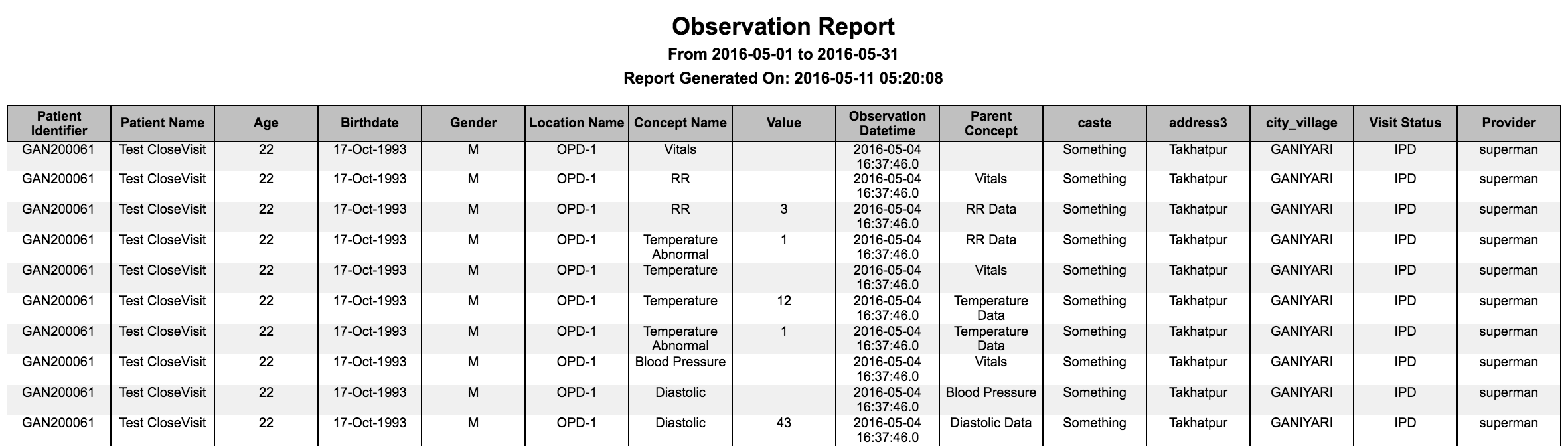
행마다 관찰 하나인 보고서

행마다 진료 사건 하나인 보고서

모든 기본 필드가 포함된 보고서
3. 관찰 양식 보고서
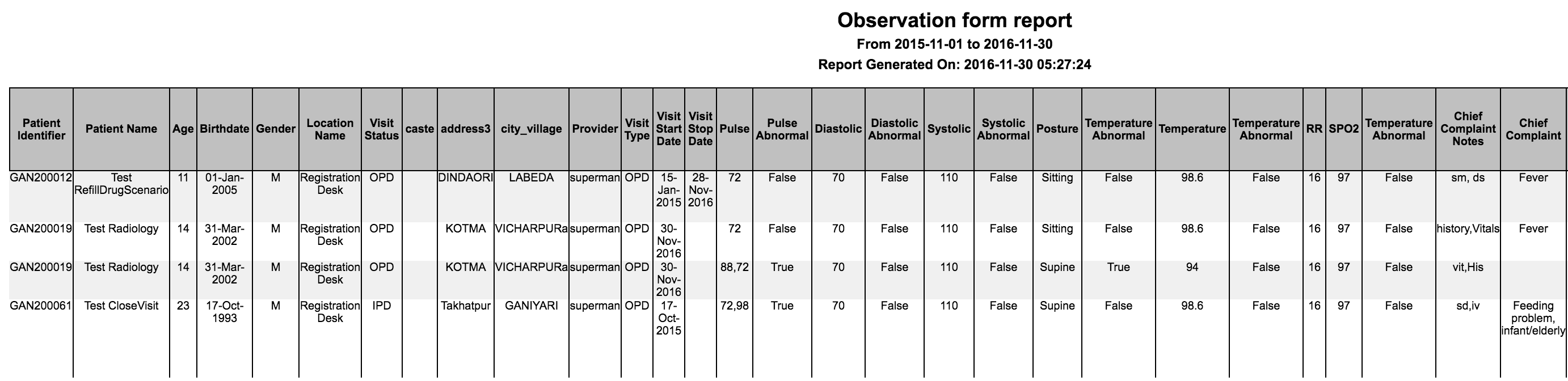
구현자는 하나 이상의 관찰 양식 정보를 추출하고, 필터를 적용하며, 출력에 표시할 필드 집합을 지정할 수 있습니다.
다음 필드는 기본 출력에 포함됩니다.
- 환자 식별자
- 환자 이름(이름 + 성)
- 나이
- 생년월일
- 성별
- 위치 이름
- 개념 이름
- 프로그램 이름(프로그램 필터 사용 시)
- 프로그램 등록일(프로그램 필터 사용 시)
- 프로그램 종료일(프로그램 필터 사용 시)
| Key | Possible Values | Description | Required | Default |
|---|---|---|---|---|
| nameOfReport | Any string | Unique key to identify the report | Yes | |
| name | Any String | Report name to be shown on report | Yes | |
| type | Type of the report | Yes | "It has to be forms" | |
| config | The section to configure what you need in the report | Yes | ||
| patientAttributes | Any patient attribute types | Fetches patient attributes and mandatory fields | No | |
| patientAddresses | Any patient address fields | Fetches patient address and mandatory fields | No | |
| visitAttributes | Any visit attribute types | Fetches visit attributes and mandatory fields | No | |
| programAttributes | Any program attribute types | Fetches program attributes and mandatory fields | No | This is applicable only if filtered by programs |
| showVisitInfo | true / false | Fetches visit information and mandatory fields. It fetches visit type, visit start date, visit stop date. | No | False |
| showProvider | true / false | Fetches providers of individual observation. | No | False |
| formNamesToFilter | Any FULLY_SPECIFIED form name | Filters observation by forms. It should be a FULLY_SPECIFIED form name | Yes | All observations contain a row for each encounter If obs form content is big or same concept used in more than one form then suggestion is to have multiple report for each form rather combine into one. |
| locationTagsToFilter | Any location tag | Filters observations by locations. | No | All locations' data. |
| applyDateRangeFor | visitStopDate /visitStartDate /programDate /obsCreatedDate / obsDate | Configures the field which we have to apply the date range for. | No | obsDate |
| programsToFilter | any program name | Filters observations by programs | No | |
| visitTypesToFilter | any visit type | Filters the visits by its type | No | All visit types |
| excludeColumns | any column names | Excludes the columns from output. | No | Doesn't exclude any columns. |
| additionalPatientIdentifiers | Any additional patient identifier type | Displays additional identifiers in the report | No | Doesn't display additional patient identifiers |
| conceptNameDisplayFormat | shortNamePreferred/fullySpecifiedName/fullySpecifiedName (shortName) | Displays the format of concept name on the report. shortNamePreferred displays the Concept Short Name if available, else the Fully Specified Name. | No | shortNamePreferred |
| preferredColumns | List of column names | Order of the columns to be displayed in the output reportNeed not mention all the columns in the config. Configured columns will be given precedence and shown first followed by all the other remaining columns in default order | No | Default order of the columns for the report.sample configurationpreferredColumns: ["Patient Name","Birth Date","Age"] |
| sortBy | List of Objects | To sort the reports output in ascending/descending order based on the configuration.Columns that are not present in the output of the report should not be configured.Sorting on Observation value may not work as expected because the value might have mixed data types. Default behaviourIf just column is configured, not the sortOrder , then default sortOrder is ascending (asc). Allowed values for "sortOrder"For key "sortOrder", "asc" or "desc" are allowed values. Configured values are case insensitive. | No | Default output for the report.sample configuration"sortBy" : [{"column" : "BirthDate", "sortOrder" : "desc"}] |
4. Form Builder 관찰 양식 보고서
구현자는 Form Builder로 만든 하나 이상의 관찰 양식 정보를 추출하고 필터 및 출력 필드를 구성할 수 있습니다.
다음 필드는 기본 출력에 포함됩니다.
- 환자 식별자
- 환자 이름(이름 + 성)
- 나이
- 생년월일
- 성별
- 위치 이름
- 개념 이름
- 프로그램 이름(프로그램 필터 사용 시)
- 프로그램 등록일(프로그램 필터 사용 시)
- 프로그램 종료일(프로그램 필터 사용 시)
| Key | Possible Values | Description | Required | Default |
|---|---|---|---|---|
| nameOfReport | Any string | Unique key to identify the report | Yes | |
| name | Any String | Report name to be shown on report | Yes | |
| type | Type of the report | Yes | "It has to be formBuilder" | |
| config | The section to configure what you need in the report | Yes | ||
| patientAttributes | Any patient attribute types | Fetches patient attributes and mandatory fields | No | |
| patientAddresses | Any patient address fields | Fetches patient address and mandatory fields | No | |
| visitAttributes | Any visit attribute types | Fetches visit attributes and mandatory fields | No | |
| programAttributes | Any program attribute types | Fetches program attributes and mandatory fields | No | This is applicable only if filtered by programs |
| showVisitInfo | true / false | Fetches visit information and mandatory fields. It fetches visit type, visit start date, visit stop date. | No | False |
| showProvider | true / false | Fetches providers of individual observation. | No | False |
| formNamesToFilter | AnyFORM BUILDER form name | Filters observation by forms. It should be a published FORM BUILDER form name | Yes | All observations contain a row for each encounter If obs form content is big or same concept used in more than one form then suggestion is to have multiple report for each form rather combine into one. |
| locationTagsToFilter | Any location tag | Filters observations by locations. | No | All locations' data. |
| applyDateRangeFor | visitStopDate /visitStartDate /programDate /obsCreatedDate / obsDate | Configures the field which we have to apply the date range for. | No | obsDate |
| programsToFilter | any program name | Filters observations by programs | No | |
| visitTypesToFilter | any visit type | Filters the visits by its type | No | All visit types |
| excludeColumns | any column names | Excludes the columns from output. | No | Doesn't exclude any columns. |
| additionalPatientIdentifiers | Any additional patient identifier type | Displays additional identifiers in the report | No | Doesn't display additional patient identifiers |
| conceptNameDisplayFormat | shortNamePreferred/fullySpecifiedName/fullySpecifiedName (shortName) | Displays the format of concept name on the report. shortNamePreferred displays the Concept Short Name if available, else the Fully Specified Name. | No | shortNamePreferred |
| preferredLocale | Any locale that has a valid translation | Fetches concepts by the locale. | No | en |
| preferredColumns | List of column names | Order of the columns to be displayed in the output reportNeed not mention all the columns in the config. Configured columns will be given precedence and shown first followed by all the other remaining columns in default order | No | Default order of the columns for the report.sample configurationpreferredColumns: ["Patient Name","Birth Date","Age"] |
| sortBy | List of Objects | To sort the reports output in ascending/descending order based on the configuration.Columns that are not present in the output of the report should not be configured.Sorting on Observation value may not work as expected because the value might have mixed data types. Default behaviourIf just column is configured, not the sortOrder , then default sortOrder is ascending (asc). Allowed values for "sortOrder"For key "sortOrder", "asc" or "desc" are allowed values. Configured values are case insensitive. | No | Default output for the report.sample configuration"sortBy" : [{"column" : "BirthDate", "sortOrder" : "desc"}] |

5. 프로그램 보고서
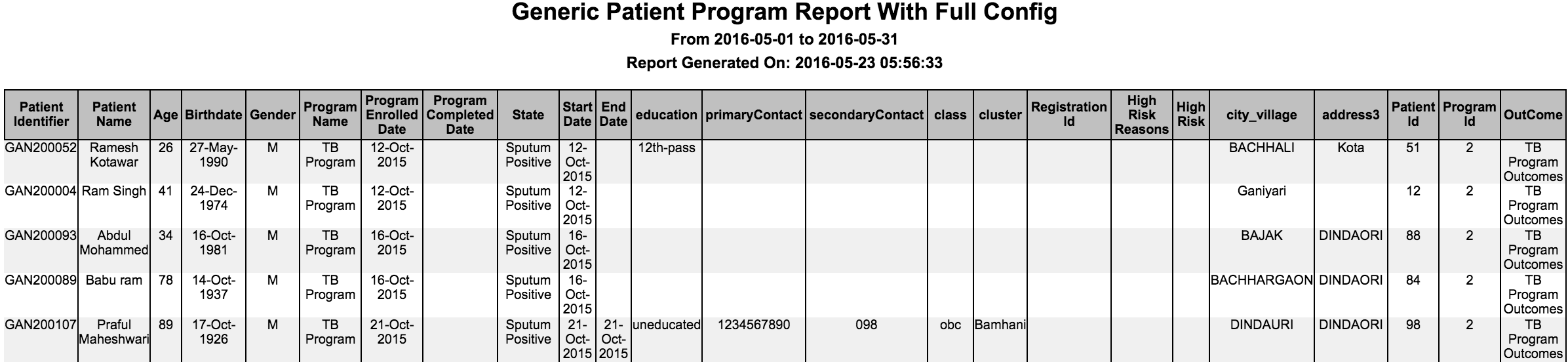
프로그램 정보를 다양한 방식으로 추출하고 필터와 출력 필드를 구성합니다.
다음 필드는 기본 출력에 포함됩니다.
- 환자 식별자, 환자 이름, 나이, 생년월일, 성별, 환자 생성일, 프로그램 이름, 등록일, 완료일, 현재 상태
| Key | Possible Values | Description | Required | Default |
|---|---|---|---|---|
| nameOfReport | Any string | Unique key to identify the report | Yes | |
| name | Any String | Report name to be shown on report | Yes | |
| type | "programs" | Type of the report | Yes | "It has to be programs" |
| config | Configure what is required in the report | No | ||
| patientAttributes | Patient Attribute Type | Fetches patient attributes and mandatory fields | No | None |
| patientAddresses | Patient address fields | Fetches patient address and mandatory fields | No | None |
| programAttributes | Program attribute type | Fetches program attributes and mandatory fields | No | None |
| programNamesToFilter | Array of program names | Filters by programs | No | All programs |
| forDataAnalysis | true / false | Fetches database ids like patient_id, program_id etc. for purpose of analysis. | No | False |
| showAllStates | true / false | Shows all the states of the program | No | False |
| excludeColumns | Any column | Excludes the columns from output. | No | Doesn't exclude any columns. |
| additionalPatientIdentifiers | Any additional patient identifier type | Displays additional identifiers in the report | No | Doesn't display any additional patient identifier |
| ageGroupName | Any age group name | Name of the age group to show in report | No | Doesn't show age group |
| preferredColumns | List of column names | Order of the columns to be displayed in the output reportNeed not mention all the columns in the config. Configured columns will be given precedence and shown first followed by all the other remaining columns in default order | No | Default order of the columns for the report.sample configurationpreferredColumns: ["Patient Name","Birth Date","Age"] |
| sortBy | List of objects | To sort the reports output in ascending/descending order based on the configuration.Columns that are not present in the output of the report should not be configured. Default behaviourIf just column is configured, not the sortOrder , then default sortOrder is ascending (asc). Allowed values for "sortOrder"For key "sortOrder", "asc" or "desc" are allowed values. Configured values are case insensitive. | No | Default output for the report.sample configuration"sortBy" : [{"column" : "BirthDate", "sortOrder" : "desc"}] |
6. 보고서 집계
관찰 보고서 같은 엔터티 기반 보고서는 데이터를 Excel로 추출한 뒤 매크로를 적용할 수 있습니다. 집계 보고서는 별도 매크로 없이 구성 자체에 피벗 정보를 지정할 수 있습니다.
| Key | Possible Values | Description | Required | Default |
|---|---|---|---|---|
| nameOfReport | Any string | Unique key to identify the report | Yes | |
| name | Any String | Report name to be shown on report | Yes | |
| type | "aggregation" | Type of the report | Yes | "It has to be aggregation" |
| config | Is the section to configure what you need in the report | Yes | ||
| report | Any existing entity based reports (Ex: observations) | Is to apply aggregation on that particular report. The config under report option refers to entity based report config. If it is observations then config values from observations report will be used here. | Yes | None |
| rowGroups | Any column name in the report on which we are doing aggregation | Includes columns to group for rows | Yes | None |
| columnGroups | Any column name in the report on which we are doing aggregation | Includes columns to group for columns | No | None |
| distinctGroups | Any column name in the report on which we are doing aggregation | Performs a distinct count on given column after grouping rows and columns | Yes | None |
| showTotalRow | true / false | Shows the Total row at the bottom of table | No | false |
| showTotalColumn | true / false | Show the Total Column as last column of table | No | false |

예시 구성은 Gender를 rowGroups, Concept Name과 Value를 columnGroups로 지정해 이완기·수축기 값에 따른 남녀 수를 표시합니다. distinctGroups의 Patient Identifier를 기준으로 집계합니다.

ReportConcatMultipleReports — 7. 여러 보고서 연결
여러 보고서를 하나로 연결합니다. 연결 보고서는 CSV를 지원하지 않으며 하나의 DB 연결만 사용할 수 있습니다(관련 논의 참조).
| Key | Possible Values | Description | Required | Default |
|---|---|---|---|---|
| nameOfReport | Any string | Unique key to identify the report | Yes | |
| name | Any String | Report name to be shown on the concatenated report | Yes | |
| type | "concatenated" | Type of the report | Yes | "It has to be concatenated" |
| config | Config for all the reports that you want in one report file. Please refer to the individual report description above for configuring them | Yes |
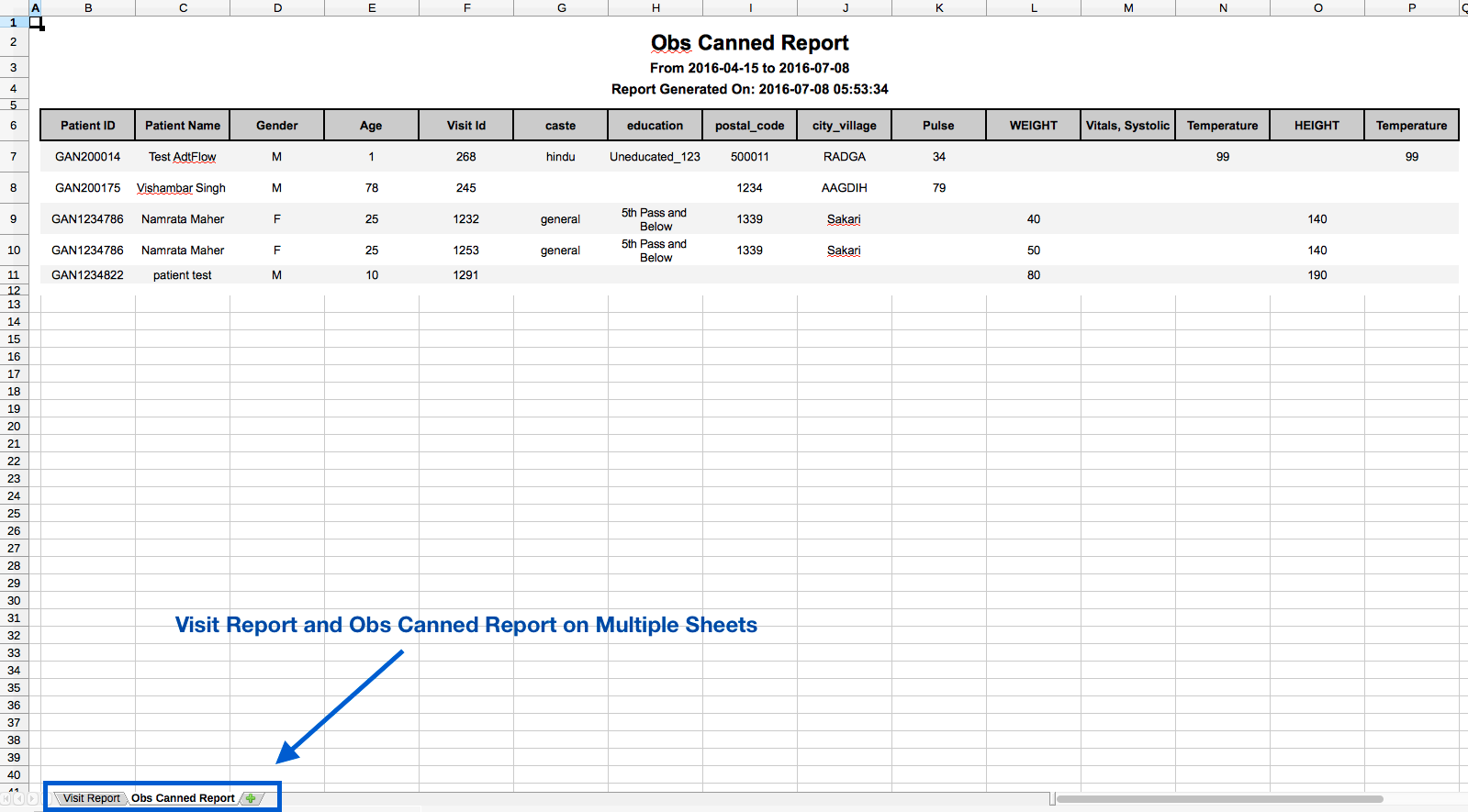
예: 방문 보고서와 Obs Canned Report를 연결하면 Excel의 서로 다른 시트에 표시됩니다. PDF, HTML 등에서는 위아래로 이어집니다.
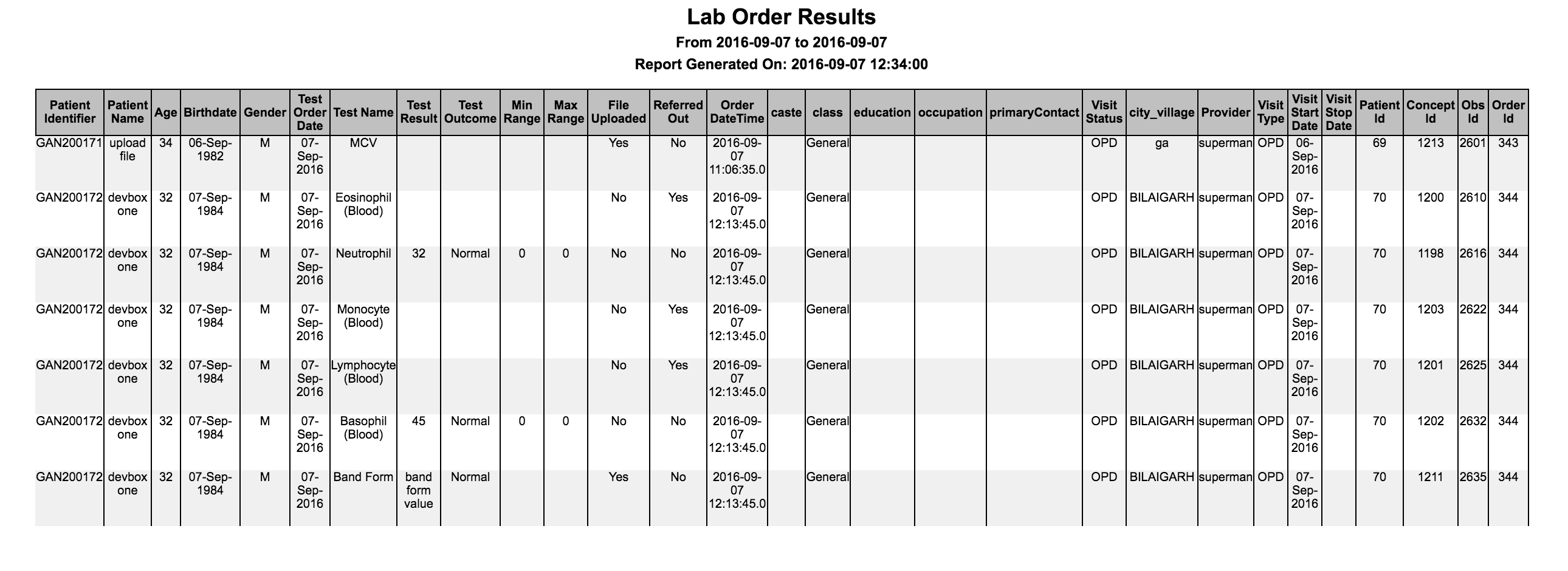
8. 검사실 결과 보고서
검사 결과를 다양한 방식으로 추출하고 필터와 출력 필드를 구성합니다.
다음 필드는 기본 출력에 포함됩니다.
- 환자 식별자, 환자 이름, 나이, 생년월일, 성별, 검사 처방일, 검사명, 결과, 판정, 결과 최소·최대 범위, 외부 의뢰 여부, 파일 업로드 여부
| Key | Possible Values | Description | Required | Default |
|---|---|---|---|---|
| nameOfReport | Any string | Unique key to identify the report | Yes | |
| name | Any string | Report name to be shown on report | Yes | |
| type | Type of the report | Yes | "It has to be labOrders" | |
| config | Configure what is required in the report | No | ||
| patientAttributes | Patient attribute types | Fetches patient attributes and mandatory fields | No | |
| patientAddresses | Patient address fields | Fetches patient address and mandatory fields | No | |
| visitAttributes | Visit attribute type | Fetches visit attributes and mandatory fields | No | |
| showVisitInfo | true / false | Fetches visit information and mandatory fields. It fetches visit type, visit start date, visit stop date. | No | False |
| showProvider | true / false | Fetches provider of individual lab result. | No | False |
| conceptNamesToFilter | FULLY_SPECIFIED concept name of a lab test | Filters lab results by any test name. The name you specify should be a FULLY_SPECIFIED concept name. | No | All lab results within specified date range |
| conceptValuesToFilter | Any test result value or numeric ranges | Fetches lab results by any test result value or numeric ranges. Format for numeric ranges:- "10..100": A range from 10 to 100 inclusive- "..100": Maximum value 100 inclusive- "10.." Minimum value of 10 inclusive | No | |
| forDataAnalysis | true / false | Fetches database ids like patient_id, concept_id, observation_id etc. | No | False |
| programsToFilter | any program name | Filters lab results by programs | No | |
| excludeColumns | any column names in the report | Excludes the columns from output | No | Doesn't exclude any columns. |
| showOrderDateTime | true / false | Shows order creation date time in the database | No | False |
| additionalPatientIdentifiers | Additional patient identifier type | Displays additional identifiers in the report | No | No additional patient identifier |
| ageGroupName | Any age group name | Name of the age group to show in report | No | No age group |
| showReferredOutTests | true / false | Filters out referred out tests based on the value | No | true |
| preferredColumns | List of column names | Order of the columns to be displayed in the output reportNeed not mention all the columns in the config. Configured columns will be given precedence and shown first followed by all the other remaining columns in default order | No | Default order of the columns for the report.sample configurationpreferredColumns: ["Patient Name","Birth Date","Age"] |
| sortBy | List of objects | To sort the reports output in ascending/descending order based on the configuration.Columns that are not present in the output of the report should not be configured. Default behaviourIf just column is configured, not the sortOrder , then default sortOrder is ascending (asc). Allowed values for "sortOrder"For key "sortOrder", "asc" or "desc" are allowed values. Configured values are case insensitive. | No | Default output for the report.sample configuration"sortBy" : [{"column" : "BirthDate", "sortOrder" : "desc"}] |
9. 용어 서버 조회 진단 보고서
fhirTSLookupDiagnosisCount와 fhirTSLookupDiagnosisLine은 기본 제공 옵션이 아니며 전체 FHIR-TS 구성을 사용할 때만 제공됩니다. 자세한 내용은 링크를 참조하세요.
용어 체계의 하위 개념 지식을 활용해 고객별 진단 건수 추출 방식을 구성할 수 있습니다. 필터와 출력 필드도 지정할 수 있습니다.
건수 보고서
다음 필드는 기본 출력에 포함됩니다.
- ??
- ?? ??
- ??
| Key | Possible Values | Description | Required | Default |
|---|---|---|---|---|
| nameOfReport | Any string | Unique key to identify the report | Yes | |
| name | Any String | Report name to be shown on the Diagnosis report | Yes | |
| type | "fhirTSLookupDiagnosisCount" | Type of the report | Yes | "It has to be fhirTSLookupDiagnosisCount" |
| config | Config for all the reports that you want in one report file. Please refer to the individual report description above for configuring them | Yes | ||
| tsConceptSource | SCT | Source of terminology lookup | Yes | |
| conceptNameDisplayFormat | shortNamePreferred/fullySpecifiedName | Displays the format of concept name on the report. shortNamePreferred displays the Concept Short Name if available, else the Fully Specified Name. | ||
| terminologyParentCode | Any valid terminology code | Terminology code whose hierarchical descendants needs to be reported | Yes | |
| displayTerminologyCode | true / false | Boolean indicator to display/hide terminology code column for the given diagnosis | Yes | false |
| terminologyColumnName | Any name | Custom column name to override the default column name | No | "Terminology Code" |
| displayGenderGroup | true / false | Boolean indicator to display/hide gender group columns for the given diagnosis | Yes | false |

행 보고서
| Key | Possible Values | Description | Required | Default |
|---|---|---|---|---|
| nameOfReport | Any string | Unique key to identify the report | Yes | |
| name | Any String | Report name to be shown on the Diagnosis report | Yes | |
| type | "fhirTSLookupDiagnosis" | Type of the report | Yes | "It has to be fhirTSLookupDiagnosis" |
| config | Config for all the reports that you want in one report file. Please refer to the individual report description above for configuring them | Yes | ||
| tsConceptSource | SCT | Source of terminology lookup | Yes | |
| conceptNameDisplayFormat | shortNamePreferred/fullySpecifiedName | Displays the format of concept name on the report. shortNamePreferred displays the Concept Short Name if available, else the Fully Specified Name. | ||
| terminologyParentCode | Any valid terminology code | Terminology code whose hierarchical descendants needs to be reported | Yes | |
| displayTerminologyCode | true / false | Boolean indicator to display/hide terminology code column for the given diagnosis | Yes | false |
| terminologyColumnName | Any name | Custom column name to override the default column name | No | "Terminology Code" |
| patientAttributes | Patient attribute types | Fetches patient attributes and mandatory fields | No | |
| patientAddresses | Patient address fields | Fetches patient address and mandatory fields | No |

확장 기능이 포함된 행 보고서
| Key | Possible Values | Description | Required | Default |
|---|---|---|---|---|
| nameOfReport | Any string | Unique key to identify the report | Yes | |
| name | Any String | Report name to be shown on the Diagnosis report | Yes | |
| type | "fhirTSLookupDiagnosisLine" | Type of the report | Yes | "It has to be fhirTSLookupDiagnosisLine" |
| config | Config for all the reports that you want in one report file. Please refer to the individual report description above for configuring them | Yes | ||
| tsConceptSource | SCT | Source of terminology lookup | Yes | |
| conceptNameDisplayFormat | shortNamePreferred/fullySpecifiedName | Displays the format of concept name on the report. shortNamePreferred displays the Concept Short Name if available, else the Fully Specified Name. | ||
| terminologyParentCode | Any valid terminology code | Terminology code whose hierarchical descendants needs to be reported | Yes | |
| displayTerminologyCode | true / false | Boolean indicator to display/hide terminology code column for the given diagnosis | Yes | false |
| terminologyColumnName | Any name | Custom column name to override the default column name | No | "Terminology Code" |
| patientAttributes | Patient attribute types | Fetches patient attributes and mandatory fields | No | |
| patientAddresses | Patient address fields | Fetches patient address and mandatory fields | No | |
| extensions | org.bahmni.reports.extensions.icd10.Icd10ResultSetExtension | Fully qualified class name for the plugin module utilized to enhance the report by adding supplementary information | No |

Bahmni Wiki · CC BY-SA 4.0