Form Builder Internationalization
Purpose and Benefits
Form Builder Internationalization feature provides ability to implementer for translating published forms to different locales. With this feature user can see the form data in the language of logged in locale if the form is translated by implementer.
Steps to internationalize a form:
- Create a form and publish it.
- Go to Home Dashboard → Implementer Interface → Form Builder. Click on translate icon for the form that needs to be internationalized.

- The page will intially have translations for default locale.To generate translations for other locale click on the drop down of locales on the top.

- Click on the drop down to select another value for the translation or write new one.
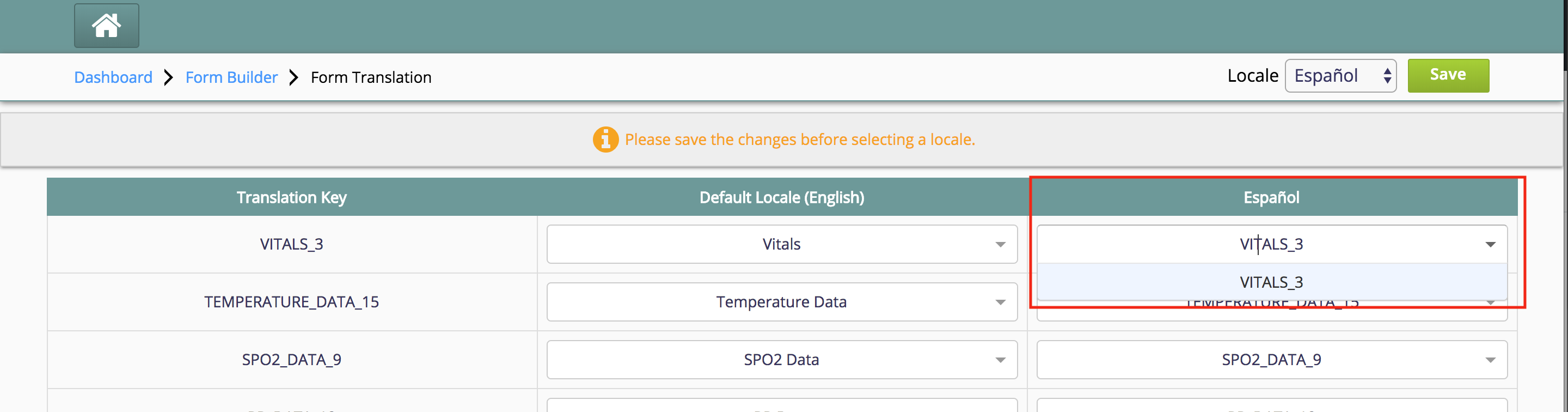
- Save the edited translations before switching to other locale.
원문 정보
원문 보기 ↗Bahmni Wiki · CC BY-SA 4.0