Admit, Discharge and Transfer Patients
Configuration
Setup Default Visit Type
Sample Config
"defaultVisitType": "IPD"Patient Movement Redirects
On Admission
This config will redirect to the configured page in the app while trying to admit the patient
"onAdmissionForwardTo": "#/patient/{{patientUuid}}/encounter/{{encounterUuid}}/bed"On Transfer
This config will redirect to the configured page in the app while trying to transfer the admitted patient
"onTransferForwardTo": "#/patient/{{patientUuid}}/encounter/{{encounterUuid}}/bed"On Discharge
This config will redirect to the configured page in the app while trying to discharge the admitted patient
"onDischargeForwardTo": "#/patient/search"Setup Max Patients per Bed
The config is to define the number of patients a bed can accommodate at once.
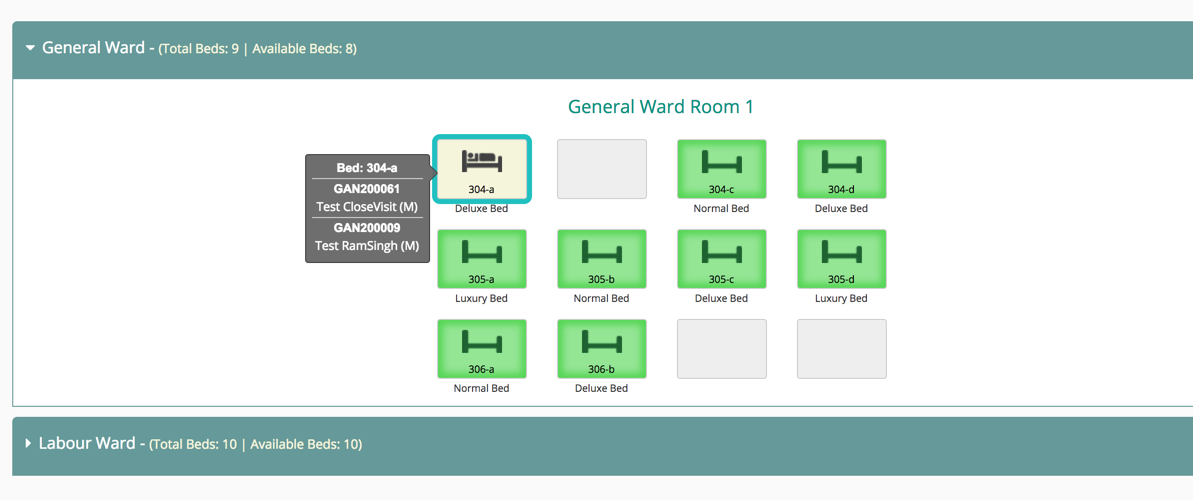
"maxPatientsPerBed" : 2Capture Data on Patient Movement
Bahmni supports configuration to capture data on selecting the Patient Movement.
"dashboard":{
                               "conceptName": "Adt Notes",
}Configure Display Controls on IPD Dashboard
can be configured on the IPD module to give a snapshot of the captured observations.
Sample Config
"dashboard":{
               "translationKey": "DASHBOARD_TAB_GENERAL_KEY",
               "sections": {
               "vitals":{
                    "translationKey":"DASHBOARD_TITLE_VITALS_KEY",
                    "type": "vitals",
                   "displayOrder": 0,
                   "isObservation": true,
                   "dashboardConfig": {
                        "conceptNames": ["Vitals"],
                    "numberOfVisits": 2
                    }
           }
}원문 정보
원문 보기 ↗Bahmni Wiki · CC BY-SA 4.0