Setting up Bahmni Dev Environment
Background
- The Bahmni EMR is a client-side application, built in AngularJS and HTML, and it interacts with the OpenMRS back end using REST web services.
- Bahmni also includes a regular OpenMRS module called bahmni-core that provides additional server-side functionality.
- Bahmni team has forked OpenELIS for Lab Test Workflow, and reporting. And the team has written modules for OpenERP (Odoo) for Inventory and Billing.
- To integrate all three sub-systems (OpenMRS, OpenERP and OpenELIS) the team wrote an ATOM Feed based integration module, that allows data to flow across the three sub-systems.
- You can refer to Bahmni Architecture here:
Dependencies to Install
Please ensure that the following dependencies are installed on your machine.
- Git version control
- Node.js
- Oracle (Sun) JDK 7
- Maven
- Ruby v2.1 (or above) - Needed by Compass to compile the SCSS files.
First Time Setup
Install Bower, Grunt and Compass
Clone the code
Clone bahmni code in the same folder where you have bahmni-environment sub-folder. Each clone command creates a sub-folder with the repository name.
Prepare and Build Bahmni EMR UI
The following commands will build the Bahmni EMR UI application. Make sure npm, bower and grunt-cli have been installed on your machine as mentioned on top of this document.
Create Links to your Host Machine Folders for EMR UI
Now link your host machine compiled code with vagrant filesystem, so that Apache running inside vagrant picks up your compiled code (basically softlinks are created inside vagrant)
# Go back into the openmrs-module-bahmniapps folder (not ui folder)
cd openmrs-module-bahmniapps

# WARNING DO THIS ONLY IF YOU HAVE COMPILED THE UI CODE ALREADY ON YOUR MACHINE. ELSE YOUR EMR UI WON'T WORK
# IF YOU ARE ONLY DOING IMPLEMENTATION SPECIFIC UI CHANGES, THEN READ THE WARNING NOTE ABOVE.

# links app folder
./scripts/vagrant-link.sh
# links dist folder
./scripts/vagrant-link.sh dist
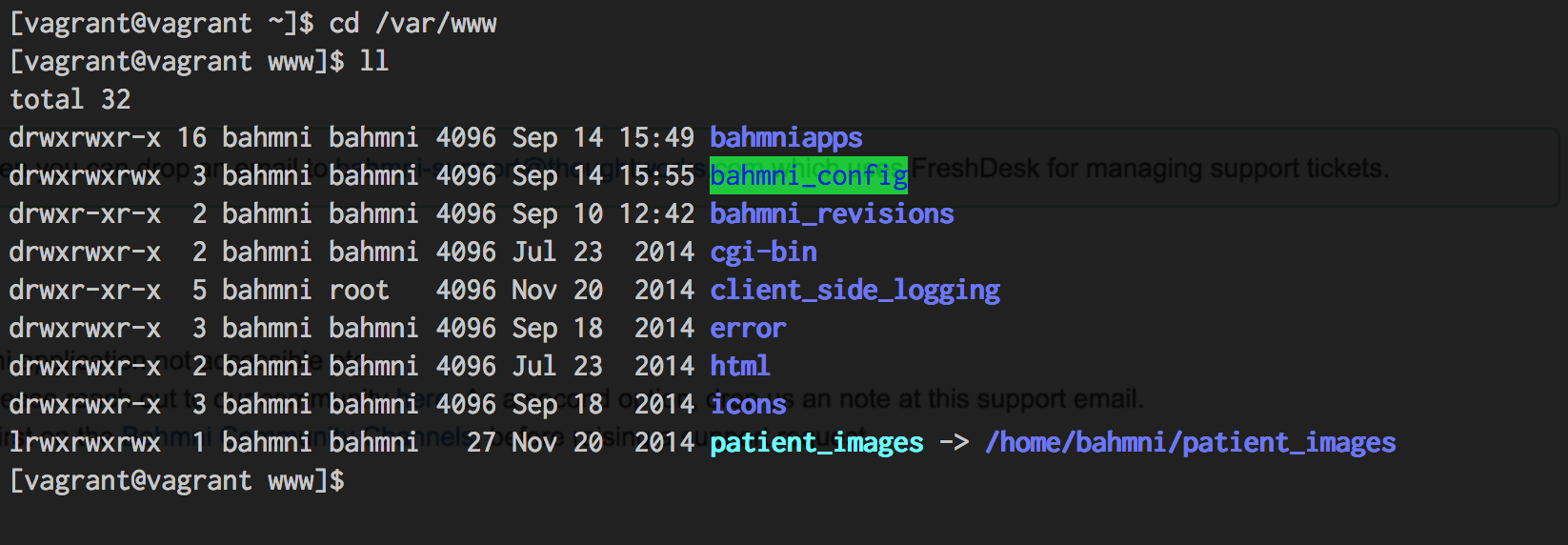
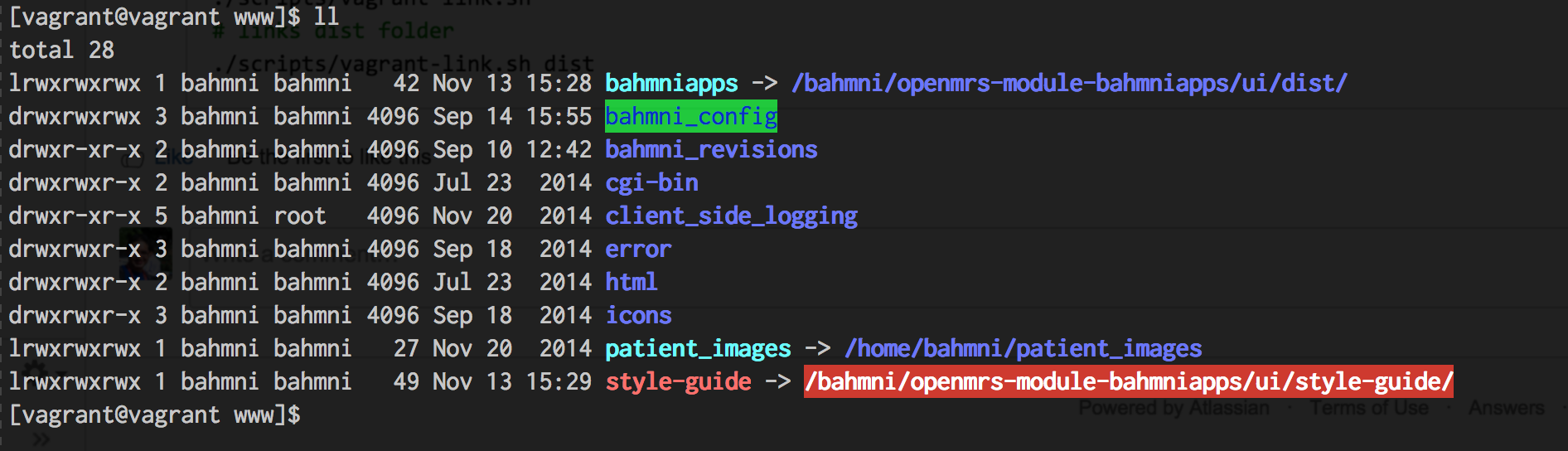
You will notice that after executing the above link commands, new soft links will get created in /var/www inside your vagrant box, linking to your machine.
BEFORE:
AFTER:
cd /Project/default-config  # or jss-config, etc

# Link the configuration
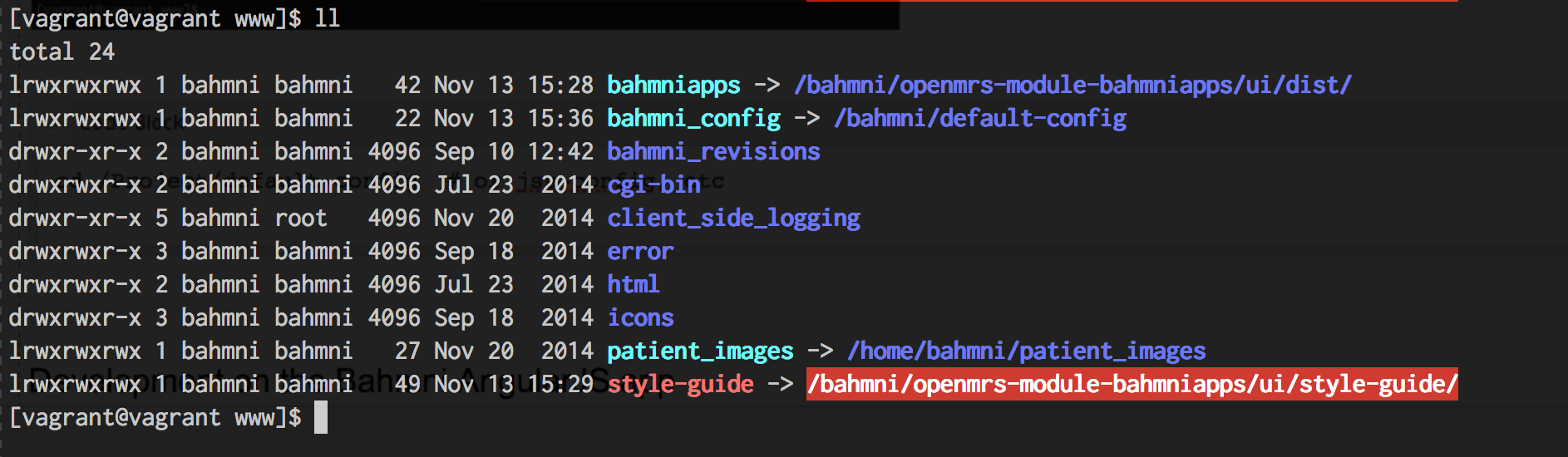
./scripts/vagrant-link.sh
CONFIG LINKED:
Development on the Bahmni AngularJS app
You have checked out the Bahmni application code (remember, it’s a client-side AngularJS application) on your local machine at
You may use whatever development tools you prefer, for editing html + js + css. If you are going to be working on both client-side and server-side code, you’ll probably want to use a Java IDE like IntelliJ or Eclipse. But if you’re purely working on the client-side app you can use something more web-focused.
Editing HTML files
You can directly edit HTML files and see the changes.
Editing JS files
You can directly edit javascript files and see the changes.
Editing CSS files
In Bahmni, CSS is written using SASS, and therefore after you edit a .scss file you need to compile everything by going to openmrs-module-bahmniapps/ui and running:
For example, edit the file /Project/bahmni/openmrs-module-bahmniapps/ui/app/styles/bahmni-helper/_base.scss by changing the color of the body element from $text to #ff0000, then build with grunt.
Developing OpenMRS Java modules
All OpenMRS modules that Bahmni uses (as third party modules), or those created by Bahmni team themselves, are stored in either: /home/bahmni/.OpenMRS/modules (old location) or in /opt/openmrs/modules (new location) folder. Check your vagrant box to see the current location. If you want to change or add a new OpenMRS/Bahmni module, you should perform the following steps.
# Stop Tomcat
sudo service tomcat stop

# Copy the module
cp module_name.omod /home/bahmni/.OpenMRS/modules

# Start Tomcat
sudo service tomcat start# Go to the appropriate project directory
cd bahmni-core
# Build the module using maven
mvn clean installDebugging Code Running in Tomcat
To debug code running in tomcat, you need to start tomcat in debug mode, so that it opens a port for you to connect your IDE to it (via Remote Debugger). You will need to do the following:
After that you will need to connect the port 8000 of your guest and host, by editing the VagrantFile
Now you can open the Remote Debugger in Eclipse/IntelliJ (or any IDE), and connect to port 8000 to debug your code.
Bahmni Wiki · CC BY-SA 4.0