Patient's Appointments Search
About the feature:
Users would like to search for patients and view the list of appointments against a patient. Patient Search is available in list view of appointments. User can search for a patient by name or by ID. The search result is a list of all appointments against the patient. Currently filters are not available on this page. Actions can be performed on the appointments in the same way as the .
Used by
Providers can use this to view past and future appointments of a particular patient.
How is it used
- In List View of appointments at the top right, there is a patient search field.
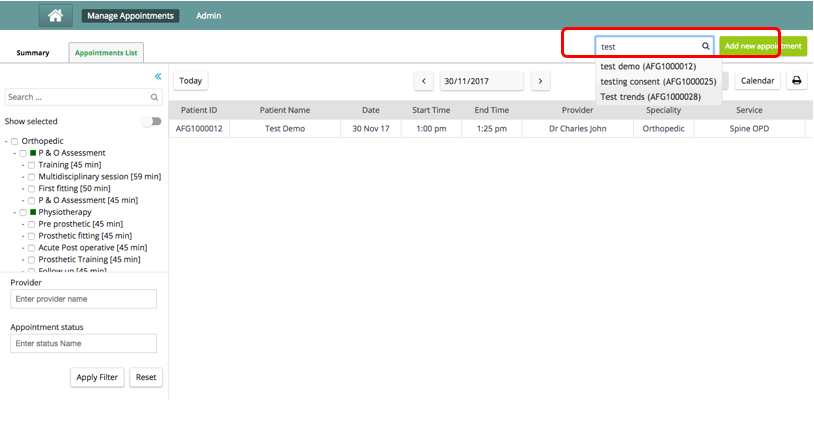
- On Searching the user, a list of all the appointments against that user will be shown.
- The filters and navigations across days and to calendar view are disabled and there is a “Reset Search” link available to go back to the list view the user came from.
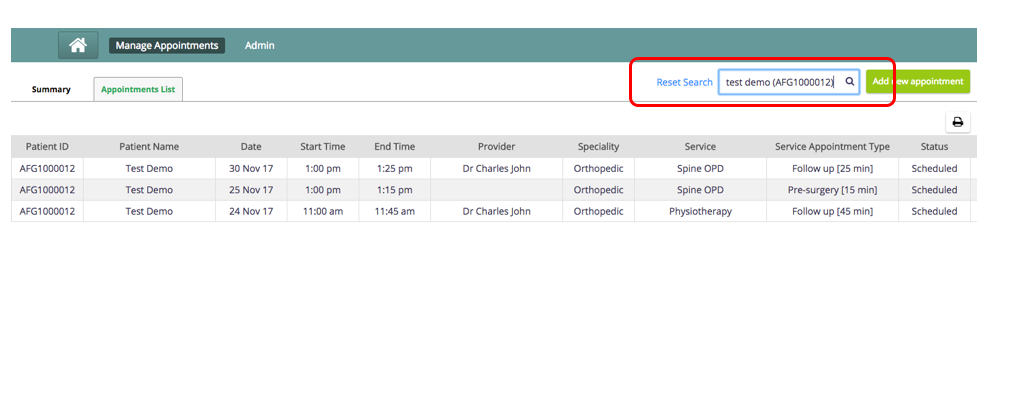
- A user can perform all the configured actions on the appointment from patient search page.
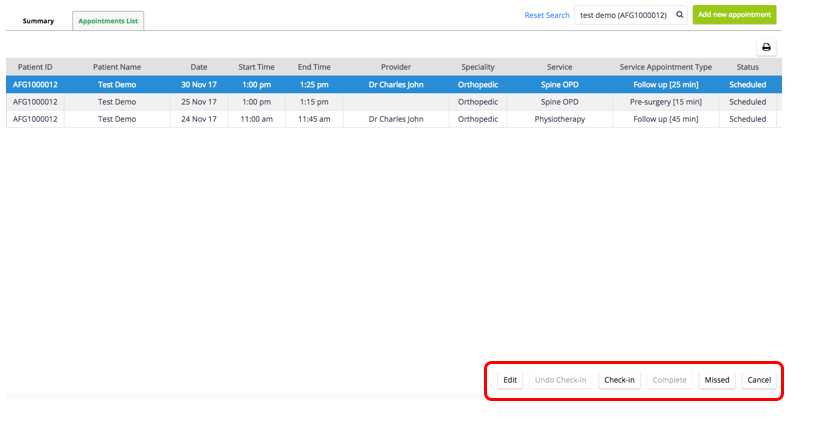
- A user can also print the results of this page by clicking on the print button. This print has the same configuration as the with additional date column added.
- The column headers are also sortable both in both ascending order and descending order. A user can click on the column name and an arrow appears beside the name, representing the type of sort. An upward arrow represents ascending order and a downward arrow represents a descending arrow.
원문 정보
원문 보기 ↗Bahmni Wiki · CC BY-SA 4.0