Overriding Configuration
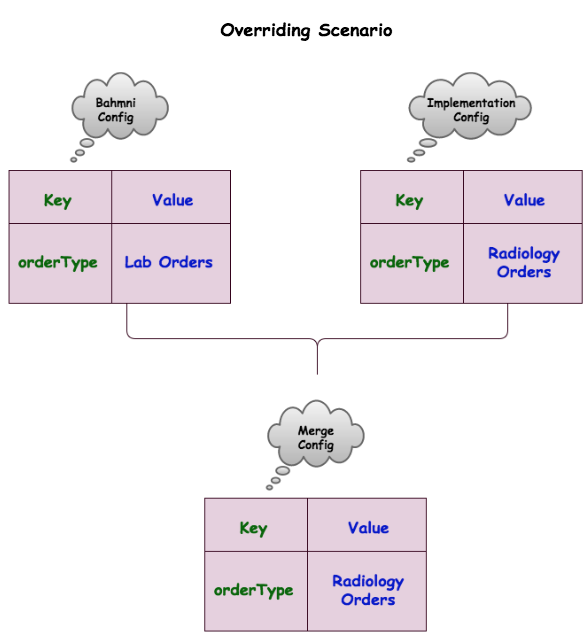
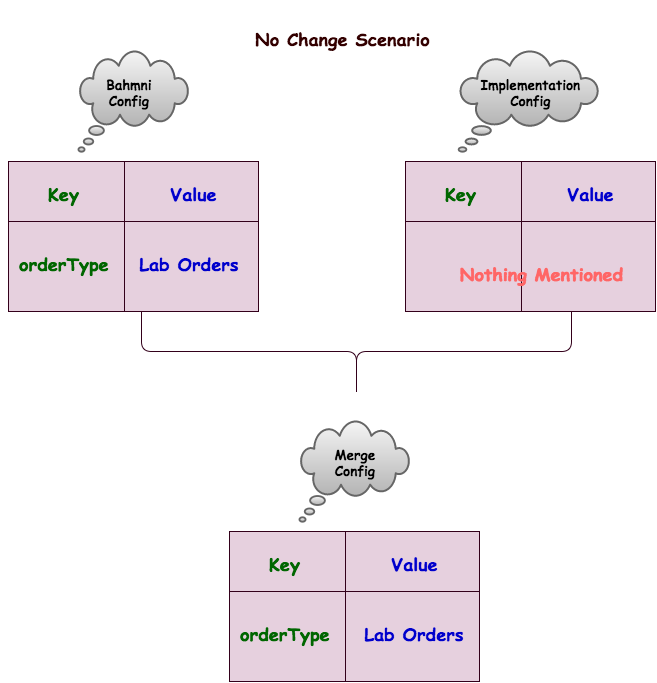
Any Bahmni configuration can be overridden by creating a separate override file. That way, an implementation with multiple entities can have a standard master configuration and each entity will have the freedom to override specific parts
.png?api=v2)
Example
Let us take an example config file:
clinical/app.json
{
        "id": "bahmni.clinical",
        "extensionPoints": [
            {
                "id": "org.bahmni.clinical.consultation.board",
                "description": "Bahmni Clinical Consultation Page"
            },
            {
                "id": "org.bahmni.clinical.conceptSetGroup.*",
                "description": "Define conceptsets part of a conceptset group"
            },
            {
                "id": "org.bahmni.clinical.orders",
                "description": "Bahmni Orders Page"
            },
            {
                "id":"org.bahmni.patient.search",
                "description": "Bahmni Patient search, lookups Page"
            }
        ],
}
To override this config file with another file, do the following two things
- Add the flag "shouldOverRideConfig: true" as shown belowjs/var/www/bahmni_config/openmrs/apps/clinical/app.jsontrue/var/www/bahmni_config/openmrs/apps/clinical/app.json
{ "id": "bahmni.clinical", "shouldOverRideConfig": true, "extensionPoints": [ { "id": "org.bahmni.clinical.consultation.board", "description": "Bahmni Clinical Consultation Page" }, { "id": "org.bahmni.clinical.conceptSetGroup.*", "description": "Define conceptsets part of a conceptset group" }, { "id": "org.bahmni.clinical.orders", "description": "Bahmni Orders Page" }, { "id":"org.bahmni.patient.search", "description": "Bahmni Patient search, lookups Page" } ], } - Create a new file openmrs/apps/clinical/app.json in the folder /var/www/implementation_config as shown belowjs/var/www/implementation_config/openmrs/apps/clinical/app.jsontrue
The above file will override the section "extensionPoints" in the the app.json file with the contents of the app.json file./var/www/implementation_config/openmrs/apps/clinical/app.json
{ "id": "bahmni.clinical", "extensionPoints": [ { "id": "org.bahmni.clinical.consultation.board", "description": "Bahmni Clinical Consultation Page" } ], } - Make sure to have an alias for implementation_config is added to "ssl.conf" under /etc/httpd/conf.d directory. Ideally this will be coming from bahmni installer itself. If not, add a new line with "Alias /implementation_config /var/www/implementation_config" where all the aliases are added.
Different types of overrides
| Type | config | overridden config | Notes |
|---|---|---|---|
| override | js | js | "observations"."name" will not be modified"observations"."showDefault" will be overridden"disposition" section will be KEPT |
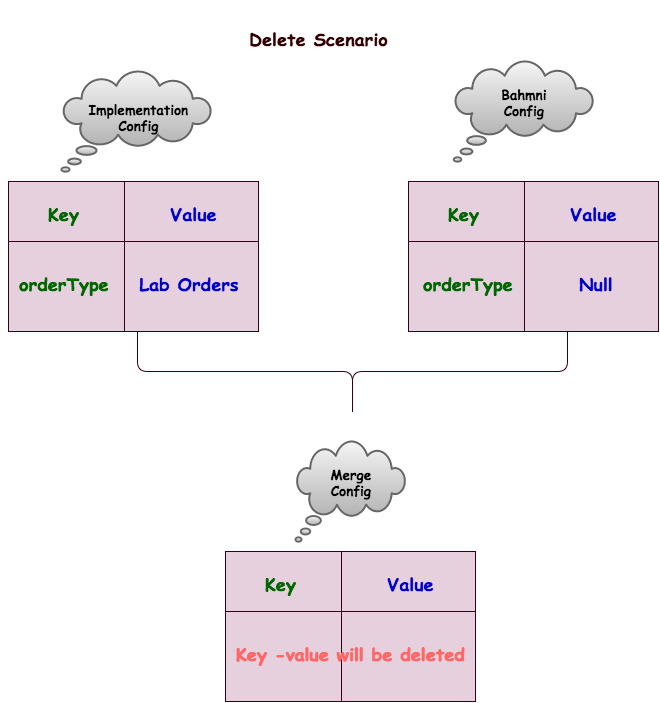
| Remove | js | js | "observations"."name" will not be modified"observations"."showDefault" will be overridden"disposition" section will be REMOVED |
sections: {
  "observations" : {
    "name" : "Observations",
    "showDefault":true
  },
  "disposition":{
   "name": "disposition"
   }
}
sections: {
"observations" : {
"showDefault":false
}
}sections: {
"observations" : {
"name" : "Observations",
"showDefault":true
},
"disposition":{
"name": "disposition"
}
}sections: {
"observations" : {
"showDefault":false
},
"disposition": null
}

원문 정보
원문 보기 ↗Bahmni Wiki · CC BY-SA 4.0