Ward Management Admin Console
Manage Admission Locations & Wards
Wards are grouped under ‘Admission Locations’.
Nesting of ward hierarchy can be up to 2 levels as shown below:
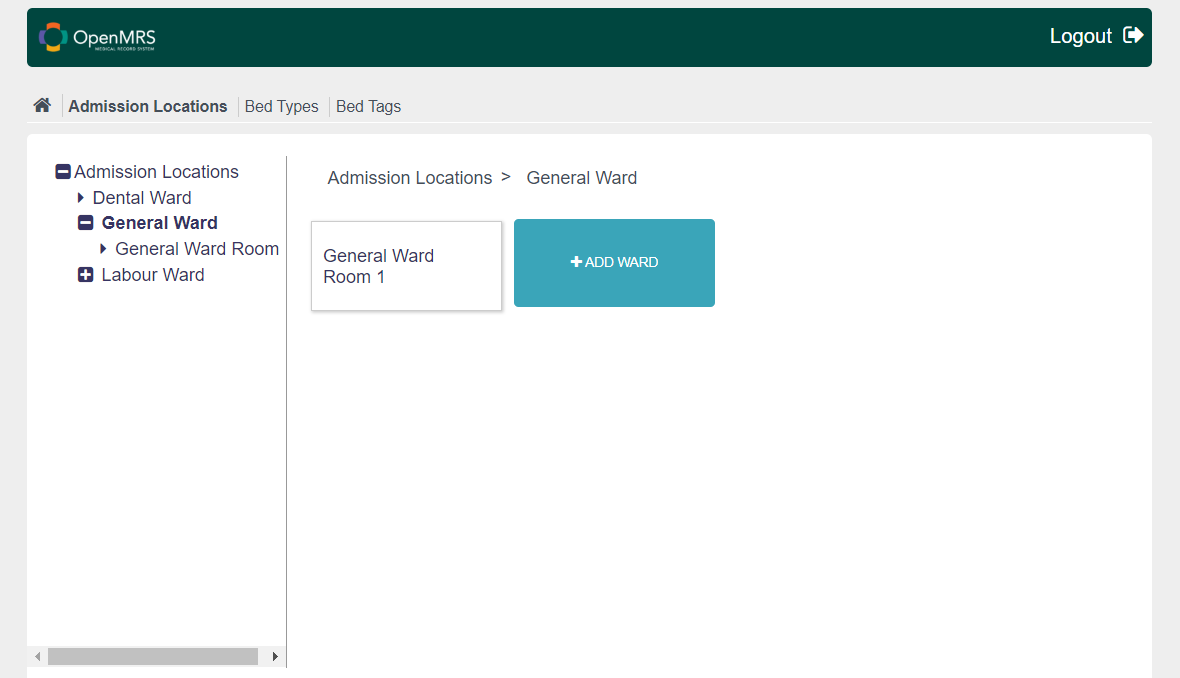
This means under Admission locations there could be a Ward with level one and under it if desired there could be other ward(s) which are room(s) under level one ward. Ward can be assigned bed layout or can have a child admission location.
.png?api=v2)
User can add new bed layout to admission location or child admission location by selecting ‘Set Bed Layout’. Set the number of Rows/Columns you have in ward (like 3 Rows and 4 columns).
Also existing bed layout could be edited later. It could be shrunk too if beds in it are not occupied by patients. But Bed layout could always be expanded.
Bed could be added in a bed layout at a row and column with a bed type, bed number.
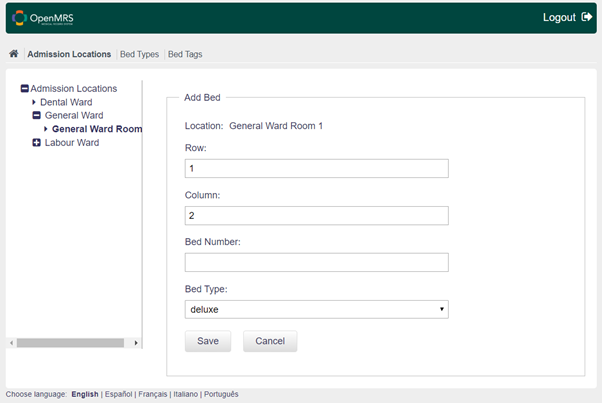
Managing Bed Types
These bed types can be added/edited by choosing the tab ‘Bed Types’ and selecting ‘Add New’/’Edit’.
.png?api=v2)
While creating a Bed in Bed Layout, one can select from the list of Bed Types, to associate with the Bed.
Managing Bed Tags
Bed Tags can be used to indicate special features in specific beds. For instance which beds have "oxygen" tanks, or have special powered beds for certain patients, etc. One can attach one/more tags to a bed to indicate optional features available in beds, so that while assigning beds to patients, one is sure an appropriate bed is assigned given the conditions/needs of the patient.
Similarly, user can create/edit bed tags by choosing the tab ‘Bed Tags’ and selecting ‘Add New’/’Edit’.
.png?api=v2)
Bahmni Wiki · CC BY-SA 4.0