기술적 고려사항
양식 정의
JSON 기반
AMPATH와 유사한 스키마를 사용해 양식 정의를 JSON으로 생성하고, 렌더러가 이를 소비해 런타임에 양식을 렌더링하는 방식입니다. 아래는 양식 정의 예시입니다.
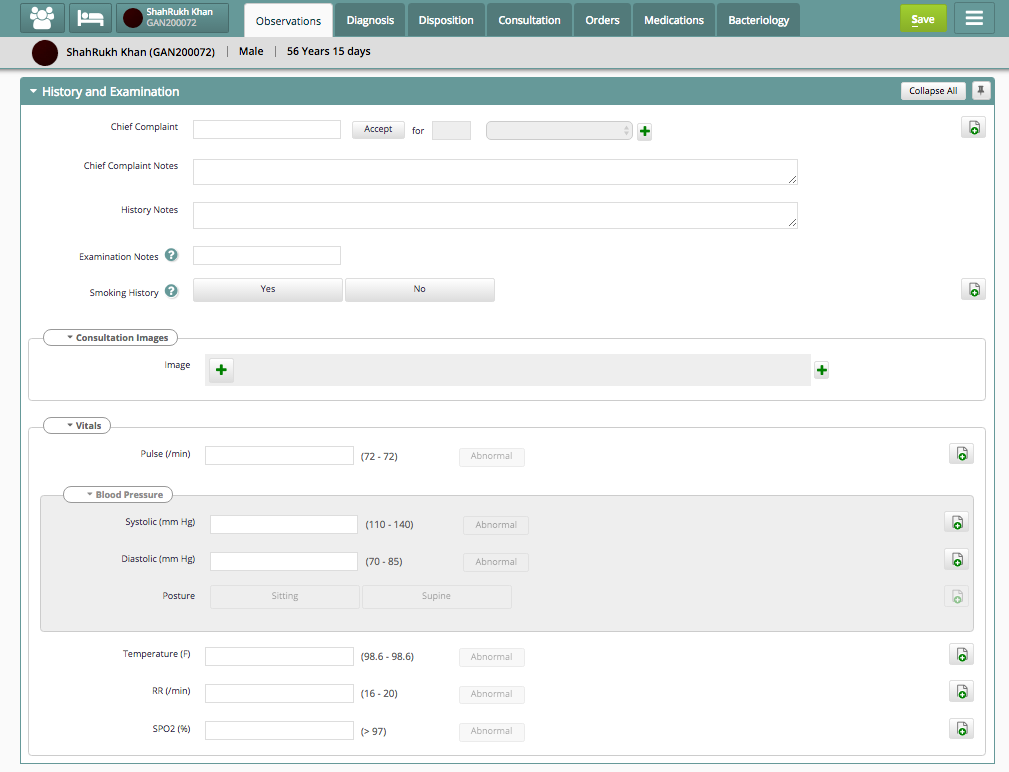
Sample History and Examination Form Definition
{
  "name": "HistoryExamination",
  "uuid": "xxxx",
  "properties": [
    {
      "version": "0.1",
      "type": "obs",
      "processor": "EncounterFormProcessor",
      "language": "en"
    }
  ],
  "includes": [
    {
      "form": [
        {
          "name": "Vitals",
          "uuid": "yyy",
          "version": "0.5"
        }
      ]
    }
  ],
  "pages": [
    {
      "header": [
        {
          "id": "1001",
          "text": "History and Examination",
          "label_key": "45678"
        }
      ],
      "columns": [
        {
          "number": "1",
          "controls": [
            {
              "type": "customcontrol",
              "name": "chiefcomplaintdata",
              "uuid": "zzzz",
              "properties": [
                {
                  "mandatory": "true",
                  "notes": "true"
                }
              ]
            },
            {
              "type": "label",
              "id": "1003",
              "text": "Chief Complaint Notes",
              "label_key": "101001",
              "for": "102"
            },
            {
              "type": "concept",
              "id": "102",
              "properties": [
                {
                  "name": "chiefcomplaintnotes",
                  "concept-uuid": "444643646",
                  "concept": "fully qualified name",
                  "mandatory": "true"
                }
              ],
              "validators": [
                {
                  "type": "lengthCheck",
                  "descriptor": [
                    {
                      "min": "15",
                      "max": "250"
                    }
                  ]
                },
                {
                  "type": "dependency",
                  "descriptor": [
                    {
                      "on": "101",
                      "mandatory": "true"
                    }
                  ]
                }
              ]
            },
            {
              "type": "label",
              "id": "1090",
              "text": "History Notes",
              "label-key": "101006",
              "for": "110"
            },
            {
              "type": "concept",
              "id": "110",
              "properties": [
                {
                  "name": "historynotes",
                  "concept-uuid": "36678622",
                  "concept": "fully qualified name",
                  "hint": "true"
                }
              ],
              "validators": [
                {
                  "type": "lengthCheck",
                  "descriptor": [
                    {
                      "max": "300"
                    }
                  ]
                }
              ]
            },
            {
              "type": "label",
              "id": "1808",
              "text": "Examination Notes",
              "label-key": "101001",
              "for": "124"
            },
            {
              "type": "concept",
              "id": "124",
              "properties": [
                {
                  "name": "examinationnotes",
                  "concept-uuid": "66677755",
                  "concept": "fully qualified name",
                  "hint": "true"
                }
              ],
              "validators": [
                {
                  "type": "lengthCheck",
                  "descriptor": [
                    {
                      "max": "250"
                    }
                  ]
                }
              ]
            },
            {
              "type": "label",
              "id": "1903",
              "text": "Smoking History",
              "label-key": "423223",
              "for": "137"
            },
            {
              "type": "concept",
              "id": "137",
              "properties": [
                {
                  "name": "smokinghistory",
                  "concept-uuid": "436456663",
                  "concept": "fully qualified name",
                  "rendering": "radio-button"
                }
              ]
            },
            {
              "type": "section",
              "id": "103",
              "label": [
                {
                  "id": "1004",
                  "text": "Consulation Images",
                  "label-key": "101003",
                  "for": "103"
                }
              ],
              "properties": [
                {
                  "name": "images",
                  "concept-uuid": "68676799",
                  "concept": "fully qualified name",
                  "allowmore": "true",
                  "rendering": "image-handler"
                }
              ]
            },
            {
              "type": "label",
              "id": "1005",
              "text": "Vitals",
              "label-key": "1010015",
              "for": "104"
            },
            {
              "type": "section",
              "id": "104",
              "properties": [
                {
                  "form-reference": "yyy"
                }
              ]
            }
          ]
        }
      ]
    }
  ]
}
장점
- 어떤 렌더링/양식 기술도 사용할 수 있습니다. 예: React 사용 결정. 복잡성을 처리할 자체 구조와 속성을 정의할 수 있습니다. 양식 마이그레이션이 더 쉬워질 수 있습니다.
AMPATH 정의와 비교
- 질문과 질문 선택지/답변 대신 제어 요소로 양식을 구성합니다. 각 제어 요소는 정의된 속성으로 자체 설명됩니다. 이 구조를 사용하면 주호소 또는 특정 주문 입력 유형 같은 사용자 지정 제어를 만들 수 있습니다. 이러한 제어는 독립적인 JavaScript일 수 있습니다.
양식 제출 데이터 모델
- 데이터, 표현, 로직의 분리를 강조해야 합니까? ‘양식 데이터’(인스턴스 데이터) 구조가 필요합니까? 양식 구조에서 이를 추론해야 합니까? 그렇지 않다면 양식 정의 자체에 포함해야 합니까?
동일한 EMR API EncounterTransaction을 사용해야 합니까?
- 그렇다면 EncounterTransaction 계약으로의 양방향 변환이 필요합니다.
기술 스택 고려사항
- 양식 디자이너. IDE 기반/데스크톱. 여러 협업자가 같은 플랫폼에서 함께 작업할 수 있도록 IntelliJ 플러그인 개발. 같은 플랫폼 안에서 JSON과 JavaScript 파일 편집 지원.
- HTML5와 JavaScript 또는 JQuery, Angular 등의 JS 프레임워크/라이브러리를 사용하는 웹 양식 디자이너. 확장 가능한 오픈 소스 웹 양식 빌더 도구 평가. 예: https://github.com/dobtco/formbuilder (http://dobtco.github.io/formbuilder) https://github.com/joshfire/jsonform/wiki http://www.jformer.com/ (jquery 기반).
React JS 웹 양식을 사용합니다.
결정: React JS 웹 양식 http://kinto.github.io/formbuilder/ 사용을 계획합니다.
양식 렌더링
- HTML5, React JS와 OpenMRS API를 연동하는 백엔드 Java 웹 서비스.
원문 정보
원문 보기 ↗Bahmni Wiki · CC BY-SA 4.0