Logging into Bahmni
About the Feature
The providers will be created by hospital admin in OpenMRS admin module. The password will be set by the administrator. Using that password the user will login for the first time. Post that, the change password feature enables all the providers to change their password in Bahmni.
Used By
This feature can be used by any providers who can login to Bahmni system
How is it Used?
Login to Bahmni
Enter your Username, Password provided by the admin (for initial login) or your changed password and select your Location.
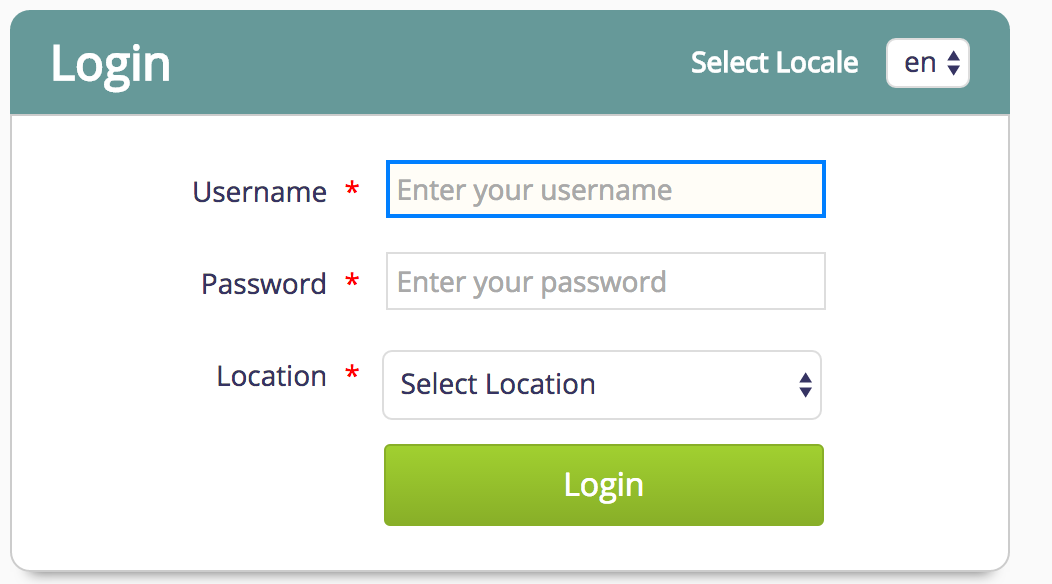
Login Screen
Change Password
In Bahmni, any logged in user can change the password. So the individual users do not need to depend on the admin to change the password. This option is available only on home dashboard.
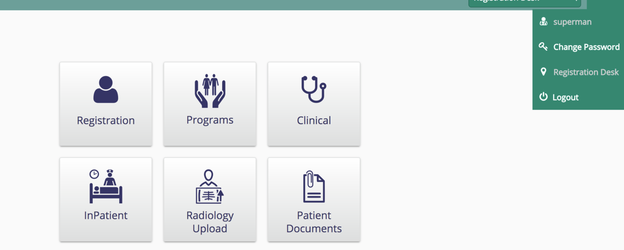
Home Dashboard
Once the user selects Change Password, he/she will be automatically redirected to the change password page.
Change Password Page
Once the password changed successfully user can go back to home dashboard by clicking on the home icon available in change password page.
하위 문서
Bahmni Wiki · CC BY-SA 4.0